One-Time Appointments
A one-time appointment is a non-recurring appointment with specified start and end dates.
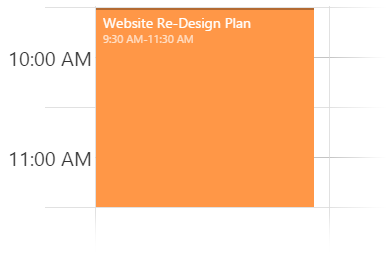
An object defining a one-time appointment has this structure.
var appointment = [{
    text: 'Meet with a customer',
    startDate: new Date(2016, 4, 10, 11, 0),
    endDate: new Date(2016, 4, 10, 13, 0)
}];
All-Day Appointments
An all-day appointment is a non-recurring appointment that covers the whole timetable's period.
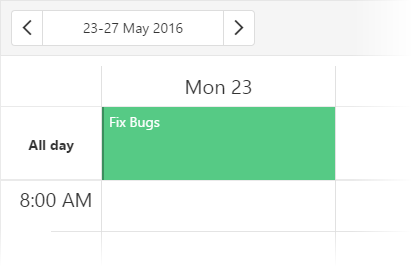
An appointment can also be marked as all-day by assigning true to the defining object's allDay field. The startDate field should also be present in this object; the endDate is optional.
var allDayAppointment = [{
    text: "Fix bugs",
    startDate: new Date(2016, 4, 10),
    allDay: true
}];
If appointments in your data source omit the allDay field but have another field instead, assign its name to the allDayExpr option.
jQuery
var allDayAppointments = [{
    text: "Fix bugs",
    startDate: new Date(2016, 4, 10),
    long: true
}];

$(function() {
    $("#schedulerContainer").dxScheduler({
        dataSource: allDayAppointments,
        allDayExpr: "long"
    });
});
Angular
<dx-scheduler
    [dataSource]="allDayAppointments"
    allDayExpr="long">
</dx-scheduler>
import { DxSchedulerModule } from "devextreme-angular";
// ...
export class AppComponent  {
    allDayAppointments = [{
        text: "Fix bugs",
        startDate: new Date(2016, 4, 10),
        long: true
    }];
}
@NgModule({
    imports: [
        // ...
        DxSchedulerModule
    ],
    // ...
})To mark an appointment as all-day in the UI, toggle the "All day" switcher on the appointment details form. This form appears when a user adds or updates an appointment.
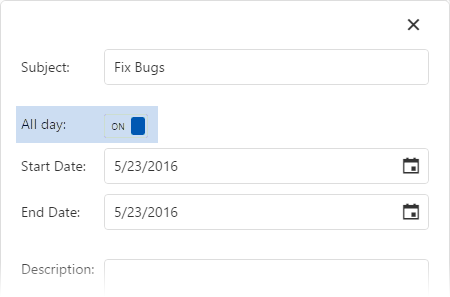
All-day appointments are displayed in the all-day panel, which is visible by default. If you are not using such appointments, hide the all-day panel along with all-day appointments by assigning false to the showAllDayPanel option.
Recurring Appointments
A recurring appointment is an appointment that repeats after a specified period of time.
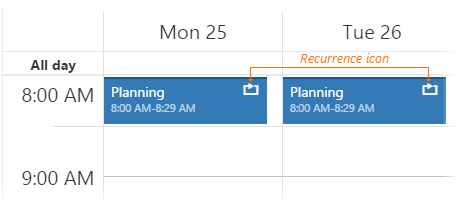
An object defining a recurring appointment should contain the recurrenceRule field that follows the iCalendar RFC 2445 specification.
var recurringAppointment = [{
    text: "Meeting",
    startDate: new Date(2016, 2, 3, 8, 0),
    endDate: new Date(2016, 2, 3, 9, 0),
    recurrenceRule: "FREQ=DAILY"
}];
If you want to exclude appointments from a recurrence, specify exceptions to the current recurring appointment using the recurrenceException option.
var recurringAppointment = [{
    text: "Meeting",
    startDate: new Date(2016, 4, 25, 10, 0),
    endDate: new Date(2016, 4, 25, 11, 00),
    recurrenceRule: "FREQ=DAILY",
    // This code excludes the 26-th and 28-th of May from the recurrence
    recurrenceException: "20160526T100000, 20160528T100000"
}];If your appointments contain other data fields instead of recurrenceRule and recurrenceException, assign their names to the recurrenceRuleExpr and recurrenceExceptionExpr options of the Scheduler instead.
jQuery
var recurringAppointments = [{
    // ...
    rule: "FREQ=DAILY",
    exception: "20160526T090000, 20160528T090000"
}];

$(function() {
    $("#schedulerContainer").dxScheduler({
        dataSource: recurringAppointments,
        recurrenceRuleExpr: "rule",
        recurrenceExceptionExpr: "exception"
    });
});
Angular
<dx-scheduler
    [dataSource]="recurringAppointments"
    recurrenceRuleExpr="rule"
    recurrenceExceptionExpr="exception">
</dx-scheduler>
import { DxSchedulerModule } from "devextreme-angular";
// ...
export class AppComponent  {
    recurringAppointments = [{
        // ...
        rule: "FREQ=DAILY",
        exception: "20160526T090000, 20160528T090000"
    }];
}
@NgModule({
    imports: [
        // ...
        DxSchedulerModule
    ],
    // ...
})
In the UI, to mark an appointment as recurring, toggle the "Repeat" switcher on the appointment details form. Then, a set of new fields will appear.
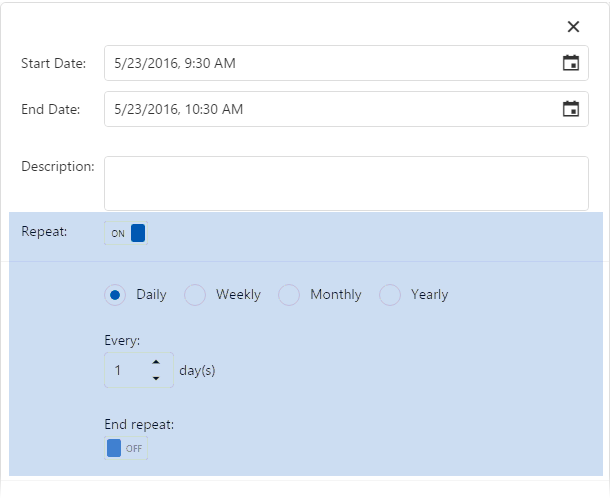
These fields will be saved as the recurrenceRule field of an appointment object. Note that although a recurring appointment is displayed as several appointments on the timetable, only a single appointment object is saved in the data source.
See Also
If you have technical questions, please create a support ticket in the DevExpress Support Center.