React Scheduler - Group Appointments by Resources
To group appointments by resources, assign an array to the groups property. Each element of this array is set to the fieldExpr property of a resource type. Note that the resource header order depends on the resource order in the resources array. The Scheduler does not support grouping resources by multiple data fields in the agenda view.
jQuery
JavaScript
var appointments = [{
    roomId: 1,
    teacherId: 2,
    text: "Meeting",
    // ...
},
// ...
];

var resources = [
    { fieldExpr: 'roomId', dataSource: roomsDataSource },
    { fieldExpr: 'teacherId', dataSource: teachersDataSource }
];

$(function(){
    $("#schedulerContainer").dxScheduler({
        dataSource: appointments,
        resources: resources,
        // Groups appointments by rooms and by teachers
        groups: ['roomId', 'teacherId']
        //...
    });
});
Angular
HTML
TypeScript
<dx-scheduler
    [dataSource]="appointments"
    [groups]="['roomId', 'teacherId']"> <!-- Groups appointments by rooms and by teachers -->
    <dxi-scheduler-resource
        fieldExpr="roomId"
        [dataSource]="rooms">
    </dxi-scheduler-resource>
    <dxi-scheduler-resource
        fieldExpr="teacherId"
        [dataSource]="teachers">
    </dxi-scheduler-resource>
</dx-scheduler>
import { DxSchedulerModule } from "devextreme-angular";
// ...
export class AppComponent  {
    // ...
    appointments = [{
        roomId: 1,
        teacherId: 2,
        text: "Meeting",
        // ...
    },
    // ...
    ];
    rooms = [
        // Resource instances
        {
            id: 1,              // Resource identifier
            text: "Room101",    // Resource name
            color: "red"        // Color for indicating appointments that use this resource
        },
        { id: 2, text: "Room102", color: "green" },
        // ...
    ];
    teachers = [
        // Resource instances
        { id: 1, text: "John Heart", color: "yellow" },
        { id: 2, text: "Sandra Johnson", color: "blue" },
        // ...
    ];
    // ...
}
@NgModule({
    imports: [
        // ...
        DxSchedulerModule
    ],
    // ...
})
Vue
App.vue
<template>
    <DxScheduler
        :data-source="appointments"
        :groups="groups">
        <DxResource
            field-expr="roomId"
            :data-source="rooms"/>
        <DxResource
            field-expr="teacherId"
            :data-source="teachers"/>
    </DxScheduler>
</template>

<script>
import 'devextreme/dist/css/dx.light.css';

import DxScheduler, { DxResource } from 'devextreme-vue/scheduler';

export default {
    components: {
        DxScheduler,
        DxResource
    },
    data() {
        return {
            groups: ['roomId', 'teacherId'], // Groups appointments by rooms and by teachers
            appointments: [{
                roomId: 1,
                teacherId: 2,
                text: "Meeting",
                // ...
            }],
            rooms: [
                // Resource instances
                {
                    id: 1,              // Resource identifier
                    text: "Room101",    // Resource name
                    color: "red"        // Color for indicating appointments that use this resource
                },
                { id: 2, text: "Room102", color: "green" },
                // ...
            ],
            teachers: [
                // Resource instances
                { id: 1, text: "John Heart", color: "yellow" },
                { id: 2, text: "Sandra Johnson", color: "blue" },
                // ...
            ]
            // ...
        }
    }
}
</script>
React
App.js
import React from 'react';

import 'devextreme/dist/css/dx.light.css';

import Scheduler, { Resource } from 'devextreme-react/scheduler';

const groups = ['roomId', 'teacherId']; // Groups appointments by rooms and by teachers
const appointments = [{
    roomId: 1,
    teacherId: 2,
    text: "Meeting",
    // ...
},
// ...
];
const rooms = [
    // Resource instances
    {
        id: 1,              // Resource identifier
        text: "Room101",    // Resource name
        color: "red"        // Color for indicating appointments that use this resource
    },
    { id: 2, text: "Room102", color: "green" },
    // ...
];
const teachers = [
    // Resource instances
    { id: 1, text: "John Heart", color: "yellow" },
    { id: 2, text: "Sandra Johnson", color: "blue" },
    // ...
];

class App extends React.Component {
    render() {
        return (
            <Scheduler
                dataSource={appointments}
                groups={groups}>
                <Resource
                    fieldExpr="roomId"
                    dataSource={rooms} />
                <Resource
                    fieldExpr="teacherId"
                    dataSource={teachers} />
            </Scheduler>
        );
    }
}
export default App;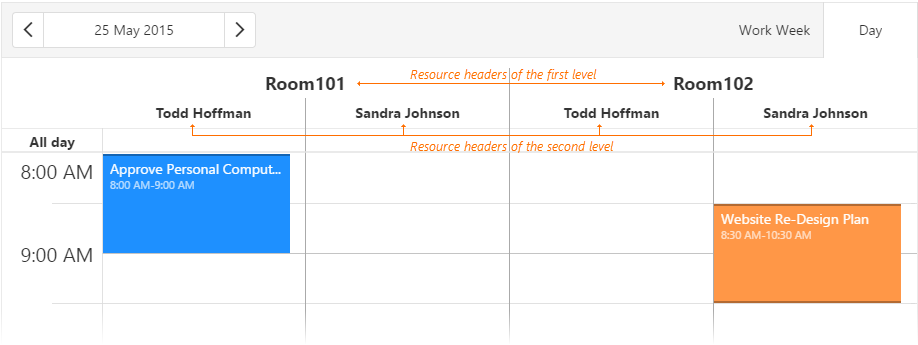
You can change resource headers orientation in an individual view using the views.groupOrientation property. In the following code, the orientation in the day view is "vertical", so that resource headers are arranged in a column:
jQuery
JavaScript
$(function(){
    $("#schedulerContainer").dxScheduler({
        // ...
        views: ["month", {
            type: "day",
            groupOrientation: "vertical"
        }]
    });
});
Angular
TypeScript
HTML
import { DxSchedulerModule } from "devextreme-angular";
// ...
export class AppComponent {
    // ...
}
@NgModule({
    imports: [
        // ...
        DxSchedulerModule
    ],
    // ...
})
<dx-scheduler ... >
    <dxi-scheduler-view type="month"></dxi-scheduler-view>
    <dxi-scheduler-view
        type="day"
        groupOrientaion="vertical">
    </dxi-scheduler-view>
</dx-scheduler>
Vue
App.vue
<template>
    <DxScheduler ... >
        <DxView type="month" />
        <DxView
            type="day"
            group-orientaion="vertical" />
    </DxScheduler>
</template>

<script>
import 'devextreme/dist/css/dx.light.css';

import DxScheduler, { DxView } from 'devextreme-vue/scheduler';

export default {
    components: {
        DxScheduler,
        DxView
    },
    data() {
        return {
            // ...
        }
    }
}
</script>
React
App.js
import React from 'react';

import 'devextreme/dist/css/dx.light.css';

import Scheduler, { View } from 'devextreme-react/scheduler';

class App extends React.Component {
    render() {
        return (
            <Scheduler ... >
                <View type="month" />
                <View
                    type="day"
                    groupOrientaion="vertical" />
            </Scheduler>
        );
    }
}
export default App;See Also
Feel free to share topic-related thoughts here.
If you have technical questions, please create a support ticket in the DevExpress Support Center.
Thank you for the feedback!
If you have technical questions, please create a support ticket in the DevExpress Support Center.