jQuery/JS Common - Object Structures - GlobalConfig
Specifies settings that affect all DevExtreme UI components.
Pass this object to the DevExpress.config(GlobalConfig) method to apply these setting, or call the same method without arguments to get the object with current settings.
DevExpress.config({
    rtlEnabled: true,
    forceIsoDateParsing: false,
    //...
});
copyStylesToShadowDom
Specifies whether to copy DevExtreme stylesheets into the Shadow DOM.
Set this property to true to inject DevExtreme stylesheets into the Shadow DOM (if the stylesheets are hosted on the same domain as index.html). Set to false to skip injection.
dateFormat
Specifies the default date format for all DevExtreme components in the application.
This property can accept a predefined format string, custom format string, or format function.
jQuery
DevExpress.config({
    dateFormat: 'yyyy-MM-dd',
});
Angular
import config from "devextreme/core/config";

config({
    dateFormat: 'yyyy-MM-dd',
});
Vue
import config from "devextreme/core/config";

config({
    dateFormat: 'yyyy-MM-dd',
});
React
import config from "devextreme/core/config";

config({
    dateFormat: 'yyyy-MM-dd',
});
You can configure default formats for specific locales. Assign an object with key-value pairs to this property. Use locale identifiers as keys. Use the default key to specify a format for all other locales:
jQuery
DevExpress.config({
    dateFormat: {
        default: 'longDate',
        en: 'shortDate',
    }
});
Angular
import config from "devextreme/core/config";

config({
    dateFormat: {
        default: 'longDate',
        en: 'shortDate',
    }
});
Vue
import config from "devextreme/core/config";

config({
    dateFormat: {
        default: 'longDate',
        en: 'shortDate',
    }
});
React
import config from "devextreme/core/config";

config({
    dateFormat: {
        default: 'longDate',
        en: 'shortDate',
    }
});
You can also specify locale-specific formats and the default format as format objects. These objects can include the locale field. Components use this locale in the following scenarios:
- When a component uses the global dateFormat
- When a component format does not specify locale and uses the "shortDate" type or the same type as the global dateFormat
- When a component uses an Intl format that does not specify locale and includes date fields but no time fields:
- Date: year, month, day, weekday
- Time: hour, minute, second
If a component uses a different date format (such as "monthAndYear"), the component displays values in the current application locale. To apply another locale, specify locale in this format.
The following code specifies the "de-DE" locale for the global dateFormat:
jQuery
DevExpress.config({
    dateFormat: {
        default: {
            type: 'shortDate',
            locale: 'de-DE',
        },
    }
});
Angular
import config from "devextreme/core/config";

config({
    dateFormat: {
        default: {
            type: 'shortDate',
            locale: 'de-DE',
        },
    }
});
Vue
import config from "devextreme/core/config";

config({
    dateFormat: {
        default: {
            type: 'shortDate',
            locale: 'de-DE',
        },
    }
});
React
import config from "devextreme/core/config";

config({
    dateFormat: {
        default: {
            type: 'shortDate',
            locale: 'de-DE',
        },
    }
});- Assign format objects to the
defaultkey or to specific locale keys. Do not declare format options directly inside dateFormat. - If a format object in dateFormat does not specify type, only the "shortDate" predefined format uses the format object's locale.
See Also
dateTimeFormat
Specifies the default date and time format for all DevExtreme components in the application.
This property can accept a predefined format string, custom format string, or format function.
jQuery
DevExpress.config({
    dateTimeFormat: 'yyyy-MM-dd, HH:mm:ss',
});
Angular
import config from "devextreme/core/config";

config({
    dateTimeFormat: 'yyyy-MM-dd, HH:mm:ss',
});
Vue
import config from "devextreme/core/config";

config({
    dateTimeFormat: 'yyyy-MM-dd, HH:mm:ss',
});
React
import config from "devextreme/core/config";

config({
    dateTimeFormat: 'yyyy-MM-dd, HH:mm:ss',
});
You can configure default formats for specific locales. Assign an object with key-value pairs to this property. Use locale identifiers as keys. Use the default key to specify a format for all other locales:
jQuery
DevExpress.config({
    dateTimeFormat: {
        default: 'longDateLongTime',
        en: 'shortDateShortTime',
    }
});
Angular
import config from "devextreme/core/config";

config({
    dateTimeFormat: {
        default: 'longDateLongTime',
        en: 'shortDateShortTime',
    }
});
Vue
import config from "devextreme/core/config";

config({
    dateTimeFormat: {
        default: 'longDateLongTime',
        en: 'shortDateShortTime',
    }
});
React
import config from "devextreme/core/config";

config({
    dateTimeFormat: {
        default: 'longDateLongTime',
        en: 'shortDateShortTime',
    }
});
You can also specify locale-specific formats and the default format as format objects. These objects can include the locale field. Components use this locale in the following scenarios:
- When a component uses the global dateTimeFormat
- When a component format does not specify locale and uses the "shortDateShortTime" type or the same type as the global dateTimeFormat
- When a component uses an Intl format that does not specify locale and includes at least one field from each group:
- Date: year, month, day, weekday
- Time: hour, minute, second
If a component uses a different date-time format (such as "longDateLongTime"), the component displays values in the current application locale. To apply another locale, specify locale in this format.
The following code specifies the "de-DE" locale for the global dateTimeFormat:
jQuery
DevExpress.config({
    dateTimeFormat: {
        default: {
            type: 'shortDateShortTime',
            locale: 'de-DE',
        },
    }
});
Angular
import config from "devextreme/core/config";

config({
    dateTimeFormat: {
        default: {
            type: 'shortDateShortTime',
            locale: 'de-DE',
        },
    }
});
Vue
import config from "devextreme/core/config";

config({
    dateTimeFormat: {
        default: {
            type: 'shortDateShortTime',
            locale: 'de-DE',
        },
    }
});
React
import config from "devextreme/core/config";

config({
    dateTimeFormat: {
        default: {
            type: 'shortDateShortTime',
            locale: 'de-DE',
        },
    }
});- Assign format objects to the
defaultkey or to specific locale keys. Do not declare format options directly inside dateTimeFormat. - If a format object in dateTimeFormat does not specify type, only the "shortDateShortTime" predefined format uses the format object's locale.
See Also
dateTimeFormatPresets
Configures overrides for predefined date/time formats.
Use this object to override predefined DevExtreme formats. You can specify overrides as custom format strings or format functions.
You can configure overrides for specific locales. To do this, specify key-value pair objects. Use locale identifiers as keys. Use the default key to specify an override for all other locales:
jQuery
DevExpress.config({
    dateTimeFormatPresets: {
        shortDate: {
            default: 'dd/MM/yyyy',
            'en-US': 'MM/dd/yyyy',
        },
        shortTime: 'HH:mm:ss',
    }
});
Angular
import config from "devextreme/core/config";

config({
    dateTimeFormatPresets: {
        shortDate: {
            default: 'dd/MM/yyyy',
            'en-US': 'MM/dd/yyyy',
        },
        shortTime: 'HH:mm:ss',
    }
});
Vue
import config from "devextreme/core/config";

config({
    dateTimeFormatPresets: {
        shortDate: {
            default: 'dd/MM/yyyy',
            'en-US': 'MM/dd/yyyy',
        },
        shortTime: 'HH:mm:ss',
    }
});
React
import config from "devextreme/core/config";

config({
    dateTimeFormatPresets: {
        shortDate: {
            default: 'dd/MM/yyyy',
            'en-US': 'MM/dd/yyyy',
        },
        shortTime: 'HH:mm:ss',
    }
});
You can also define overrides as format objects. Assign these objects to specific locale keys or the default key. To display values in a specific locale, add the locale field to the format object.
jQuery
DevExpress.config({
    dateTimeFormatPresets: {
        longDateLongTime: {
            default: {
                type: 'longDateLongTime',
                locale: 'en-CA',
            },
        },
    },
});
Angular
import config from "devextreme/core/config";

config({
    dateTimeFormatPresets: {
        longDateLongTime: {
            default: {
                type: 'longDateLongTime',
                locale: 'en-CA',
            },
        },
    },
});
Vue
import config from "devextreme/core/config";

config({
    dateTimeFormatPresets: {
        longDateLongTime: {
            default: {
                type: 'longDateLongTime',
                locale: 'en-CA',
            },
        },
    },
});
React
import config from "devextreme/core/config";

config({
    dateTimeFormatPresets: {
        longDateLongTime: {
            default: {
                type: 'longDateLongTime',
                locale: 'en-CA',
            },
        },
    },
});decimalSeparator
A decimal separator. No longer applies.
Beginning with v19.2, the separator is selected based on the specified locale. See Localize Dates, Numbers, and Currencies for more information.
defaultCurrency
The default currency. Accepts a 3-letter ISO 4217 code.
jQuery
DevExpress.config({ defaultCurrency: 'EUR' });
// ===== or when using modules =====
import config from "devextreme/core/config";

config({
    defaultCurrency: 'EUR'
});
Angular
import config from "devextreme/core/config";

config({
    defaultCurrency: 'EUR'
});
Vue
import config from "devextreme/core/config";

config({
    defaultCurrency: 'EUR'
});
React
import config from "devextreme/core/config";

config({
    defaultCurrency: 'EUR'
});
See Also
defaultUseCurrencyAccountingStyle
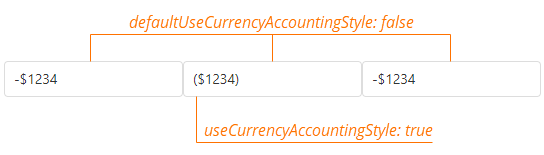
Specifies whether to apply the accounting style to formatted numbers of the currency type.
The accounting style adds parentheses to negative numbers instead of the minus sign. To disable the accounting style globally and display formatted numbers of the currency type with the minus sign, set this property to false.
jQuery
DevExpress.config({ defaultUseCurrencyAccountingStyle: false });
// ===== or when using modules =====
import config from "devextreme/core/config";

config({
    defaultCurrency: 'EUR'
});
Angular
import config from "devextreme/core/config";

config({
    defaultUseCurrencyAccountingStyle: false
});
Vue
import config from "devextreme/core/config";

config({
    defaultUseCurrencyAccountingStyle: false
});
React
import config from "devextreme/core/config";

config({
    defaultUseCurrencyAccountingStyle: false
});
This property specifies the global accounting style setting. If you want to override this setting for a component, specify the useCurrencyAccountingStyle property in the component's format object.
editorStylingMode
Specifies how editors' text fields are styled in your application.
The following styles are available:

DevExpress.config({
    editorStylingMode: 'filled' // or 'outlined' | 'underlined'
});floatingActionButtonConfig
Configures a Floating Action Button (FAB) that emits a stack of related actions (speed dial).
If you change this object at runtime, call the DevExpress.ui.repaintFloatingActionButton() method afterwards to apply the changes.
forceIsoDateParsing
Specifies whether dates are parsed and serialized according to the ISO 8601 standard in all browsers.
The default value is true. This implies that UI components detect date-time values' format automatically. If the values are not provided to the UI component yet, you need to specify the format explicitly using the UI component's dateSerializationFormat property. When you assign false to the forceIsoDateParsing, a browser's resources are utilized to parse and serialize date-time values.
licenseKey
A license key.
For instructions on how to obtain and register a license key, refer to the following help topic: Obtain and Register Your License Key.
numberFormat
Specifies the default number format for all DevExtreme components in the application.
This property can accept a predefined format string, custom format string, or format function.
jQuery
DevExpress.config({
    numberFormat: '#0.#',
});
Angular
import config from "devextreme/core/config";

config({
    numberFormat: '#0.#',
});
Vue
import config from "devextreme/core/config";

config({
    numberFormat: '#0.#',
});
React
import config from "devextreme/core/config";

config({
    numberFormat: '#0.#',
});
You can configure default formats for specific locales. Assign an object with key-value pairs to this property. Use locale identifiers as keys. Use the default key to specify a format for all other locales:
jQuery
DevExpress.config({
    numberFormat: {
        default: 'billions',
        en: 'millions',
    }
});
Angular
import config from "devextreme/core/config";

config({
    numberFormat: {
        default: 'billions',
        en: 'millions',
    }
});
Vue
import config from "devextreme/core/config";

config({
    numberFormat: {
        default: 'billions',
        en: 'millions',
    }
});
React
import config from "devextreme/core/config";

config({
    numberFormat: {
        default: 'billions',
        en: 'millions',
    }
});
You can also specify locale-specific formats and the default format as format objects. These objects can include the locale field. Components use this locale in the following scenarios:
- When a component uses the global numberFormat
- When a component format does not specify locale
This locale also defines decimal and group separators in custom format strings. To apply another locale to component formats, specify locale in these formats.
The following code specifies the "de-DE" locale for the global numberFormat:
jQuery
DevExpress.config({
    numberFormat: {
        default: {
            type: 'fixedPoint',
            precision: 2,
            locale: 'de-DE',
        },
    }
});
Angular
import config from "devextreme/core/config";

config({
    numberFormat: {
        default: {
            type: 'fixedPoint',
            precision: 2,
            locale: 'de-DE',
        },
    }
});
Vue
import config from "devextreme/core/config";

config({
    numberFormat: {
        default: {
            type: 'fixedPoint',
            precision: 2,
            locale: 'de-DE',
        },
    }
});
React
import config from "devextreme/core/config";

config({
    numberFormat: {
        default: {
            type: 'fixedPoint',
            precision: 2,
            locale: 'de-DE',
        },
    }
});default key or to specific locale keys. Do not declare format options directly inside numberFormat.See Also
oDataFilterToLower
Specifies whether to convert string values to lowercase in filter and search requests to OData services. Applies to the following operations: "startswith", "endswith", "contains", and "notcontains".
When the oDataFilterToLower property is true, the filter expression sent to the server contains a tolower() function call and a lowercase filter value.
jQuery
DevExpress.config({
    oDataFilterToLower: true
});
// ===== or when using modules =====
import config from "devextreme/core/config";

config({
    oDataFilterToLower: true
})

// The filter expression in the request looks like the following:
// https://...?filter=startswith(tolower(Product_Name), 'tel')
Angular
import config from "devextreme/core/config";

config({
    oDataFilterToLower: true
})

// The filter expression in the request looks like the following:
// https://...?filter=startswith(tolower(Product_Name), 'tel')
Vue
import config from "devextreme/core/config";

config({
    oDataFilterToLower: true
})

// The filter expression in the request looks like the following:
// https://...?filter=startswith(tolower(Product_Name), 'tel')
React
import config from "devextreme/core/config";

config({
    oDataFilterToLower: true
})

// The filter expression in the request looks like the following:
// https://...?filter=startswith(tolower(Product_Name), 'tel')
You can use the filterToLower property in an individual ODataStore or ODataContext to control the same functionality.
rtlEnabled
Specifies whether the UI components support a right-to-left representation. Available for individual UI components as well.
serverDecimalSeparator
The decimal separator that is used when submitting a value to the server.
thousandsSeparator
A group separator. No longer applies.
Beginning with v19.2, the separator is selected based on the specified locale. See Localize Dates, Numbers, and Currencies for more information.
timeFormat
Specifies the default time format for all DevExtreme components in the application.
This property can accept a predefined format string, custom format string, or format function.
jQuery
DevExpress.config({
    timeFormat: 'HH:mm:ss',
});
Angular
import config from "devextreme/core/config";

config({
    timeFormat: 'HH:mm:ss',
});
Vue
import config from "devextreme/core/config";

config({
    timeFormat: 'HH:mm:ss',
});
React
import config from "devextreme/core/config";

config({
    timeFormat: 'HH:mm:ss',
});
You can configure default formats for specific locales. Assign an object with key-value pairs to this property. Use locale identifiers as keys. Use the default key to specify a format for all other locales:
jQuery
DevExpress.config({
    timeFormat: {
        default: 'longTime',
        en: 'shortTime',
    }
});
Angular
import config from "devextreme/core/config";

config({
    timeFormat: {
        default: 'longTime',
        en: 'shortTime',
    }
});
Vue
import config from "devextreme/core/config";

config({
    timeFormat: {
        default: 'longTime',
        en: 'shortTime',
    }
});
React
import config from "devextreme/core/config";

config({
    timeFormat: {
        default: 'longTime',
        en: 'shortTime',
    }
});
You can also specify locale-specific formats and the default format as format objects. These objects can include the locale field. Components use this locale in the following scenarios:
- When a component uses the global timeFormat
- When a component format does not specify locale and uses the "shortTime" type or the same type as the global timeFormat
- When a component uses an Intl format that does not specify locale and includes time fields but no date fields:
- Time: hour, minute, second
- Date: year, month, day, weekday
If a component uses a different time format (such as "longTime"), the component displays values in the current application locale. To apply another locale, specify locale in this format.
The following code specifies the "de-DE" locale for the global timeFormat:
jQuery
DevExpress.config({
    timeFormat: {
        default: {
            type: 'shortTime',
            locale: 'de-DE',
        },
    }
});
Angular
import config from "devextreme/core/config";

config({
    timeFormat: {
        default: {
            type: 'shortTime',
            locale: 'de-DE',
        },
    }
});
Vue
import config from "devextreme/core/config";

config({
    timeFormat: {
        default: {
            type: 'shortTime',
            locale: 'de-DE',
        },
    }
});
React
import config from "devextreme/core/config";

config({
    timeFormat: {
        default: {
            type: 'shortTime',
            locale: 'de-DE',
        },
    }
});- Assign format objects to the
defaultkey or to specific locale keys. Do not declare format options directly inside timeFormat. - If a format object in timeFormat does not specify type, only the "shortTime" predefined format uses the format object's locale.
See Also

 Select one or more answers