JavaScript/jQuery TabPanel - Overview
DevExtreme TabPanel is a UI component that displays content in panes and allows users to switch between them using tabs.
This overview highlights TabPanel elements, key features, and what to explore next.
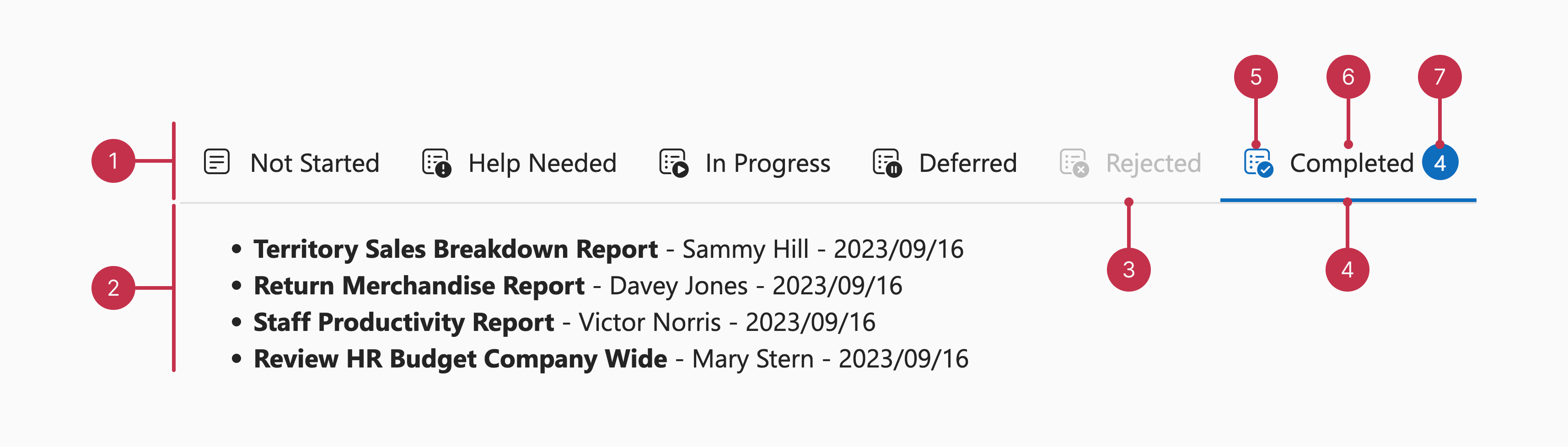
Key Features
Data Binding
TabPanel supports different data source types and can update displayed items when data is modified.Layout Configuration
The component can arrange tabs horizontally or vertically. TabPanel also allows you to position tabs along any edge of the component: top, bottom, left, or right.Tab Configuration
TabPanel supports tab icons, badges, and titles. The component allows you to specify the icon position to adjust the layout of tabs that contain icons. You can also configure the styling mode of active tabs, as well as disable tabs that users should not access.Accessibility and Keyboard Navigation
TabPanel conforms to WCAG 2.x, European Accessibility Act (EAA), and Americans with Disabilities Act (ADA) standards. The component supports keyboard navigation and custom key handlers. TabPanel also ships with right-to-left (RTL) representation support.Customization
You can use templates to define custom markup for individual TabPanel tabs or all tabs, and for individual panels or all panels. You can also enable or disable swipe gestures and transition animations to customize how users switch between tabs.

 Select one or more answers