jQuery/JS Common - Object Structures - GlobalConfig
Specifies settings that affect all DevExtreme UI components.
Pass this object to the DevExpress.config(GlobalConfig) method to apply these setting, or call the same method without arguments to get the object with current settings.
DevExpress.config({
    rtlEnabled: true,
    forceIsoDateParsing: false,
    //...
});
copyStylesToShadowDom
Specifies whether to copy DevExtreme stylesheets into the Shadow DOM.
Set this property to true to inject DevExtreme stylesheets into the Shadow DOM (if the stylesheets are hosted on the same domain as index.html). Set to false to skip injection.
dateFormat
Specifies the default date format for all DevExtreme components in the application.
This property can accept a predefined format string, custom format string, or format function.
jQuery
DevExpress.config({
    dateFormat: 'yyyy-MM-dd',
});
Angular
import config from "devextreme/core/config";

config({
    dateFormat: 'yyyy-MM-dd',
});
Vue
import config from "devextreme/core/config";

config({
    dateFormat: 'yyyy-MM-dd',
});
React
import config from "devextreme/core/config";

config({
    dateFormat: 'yyyy-MM-dd',
});
You can configure default formats for specific locales. Assign an object with key-value pairs to this property. Use locale identifiers as keys. Use the default key to specify a format for all other locales:
jQuery
DevExpress.config({
    dateFormat: {
        default: 'longDate',
        en: 'shortDate',
    }
});
Angular
import config from "devextreme/core/config";

config({
    dateFormat: {
        default: 'longDate',
        en: 'shortDate',
    }
});
Vue
import config from "devextreme/core/config";

config({
    dateFormat: {
        default: 'longDate',
        en: 'shortDate',
    }
});
React
import config from "devextreme/core/config";

config({
    dateFormat: {
        default: 'longDate',
        en: 'shortDate',
    }
});
dateTimeFormat
Specifies the default date and time format for all DevExtreme components in the application.
This property can accept a predefined format string, custom format string, or format function.
jQuery
DevExpress.config({
    dateTimeFormat: 'yyyy-MM-dd, HH:mm:ss',
});
Angular
import config from "devextreme/core/config";

config({
    dateTimeFormat: 'yyyy-MM-dd, HH:mm:ss',
});
Vue
import config from "devextreme/core/config";

config({
    dateTimeFormat: 'yyyy-MM-dd, HH:mm:ss',
});
React
import config from "devextreme/core/config";

config({
    dateTimeFormat: 'yyyy-MM-dd, HH:mm:ss',
});
You can configure default formats for specific locales. Assign an object with key-value pairs to this property. Use locale identifiers as keys. Use the default key to specify a format for all other locales:
jQuery
DevExpress.config({
    dateTimeFormat: {
        default: 'longDateLongTime',
        en: 'shortDateShortTime',
    }
});
Angular
import config from "devextreme/core/config";

config({
    dateTimeFormat: {
        default: 'longDateLongTime',
        en: 'shortDateShortTime',
    }
});
Vue
import config from "devextreme/core/config";

config({
    dateTimeFormat: {
        default: 'longDateLongTime',
        en: 'shortDateShortTime',
    }
});
React
import config from "devextreme/core/config";

config({
    dateTimeFormat: {
        default: 'longDateLongTime',
        en: 'shortDateShortTime',
    }
});
dateTimeFormatPresets
Configures overrides for predefined date/time formats.
Use this object to override predefined DevExtreme formats. You can specify overrides as custom format strings or format functions.
You can configure overrides for specific locales. To do this, specify key-value pair objects. Use locale identifiers as keys. Use the default key to specify an override for all other locales:
jQuery
DevExpress.config({
    dateTimeFormatPresets: {
        shortDate: {
            default: 'dd/MM/yyyy',
            'en-US': 'MM/dd/yyyy',
        },
        shortTime: 'HH:mm:ss',
    }
});
Angular
import config from "devextreme/core/config";

config({
    dateTimeFormatPresets: {
        shortDate: {
            default: 'dd/MM/yyyy',
            'en-US': 'MM/dd/yyyy',
        },
        shortTime: 'HH:mm:ss',
    }
});
Vue
import config from "devextreme/core/config";

config({
    dateTimeFormatPresets: {
        shortDate: {
            default: 'dd/MM/yyyy',
            'en-US': 'MM/dd/yyyy',
        },
        shortTime: 'HH:mm:ss',
    }
});
React
import config from "devextreme/core/config";

config({
    dateTimeFormatPresets: {
        shortDate: {
            default: 'dd/MM/yyyy',
            'en-US': 'MM/dd/yyyy',
        },
        shortTime: 'HH:mm:ss',
    }
});decimalSeparator
A decimal separator. No longer applies.
Since v19.2, the separator is selected based on the specified locale. See Localize Dates, Numbers, and Currencies for more information.
defaultCurrency
The default currency. Accepts a 3-letter ISO 4217 code.
jQuery
DevExpress.config({ defaultCurrency: 'EUR' });
// ===== or when using modules =====
import config from "devextreme/core/config";

config({
    defaultCurrency: 'EUR'
});
Angular
import config from "devextreme/core/config";

config({
    defaultCurrency: 'EUR'
});
Vue
import config from "devextreme/core/config";

config({
    defaultCurrency: 'EUR'
});
React
import config from "devextreme/core/config";

config({
    defaultCurrency: 'EUR'
});
See Also
defaultUseCurrencyAccountingStyle
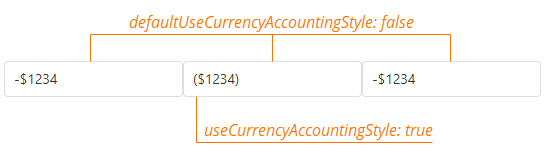
Specifies whether to apply the accounting style to formatted numbers of the currency type.
The accounting style adds parentheses to negative numbers instead of the minus sign. To disable the accounting style globally and display formatted numbers of the currency type with the minus sign, set this property to false.
jQuery
DevExpress.config({ defaultUseCurrencyAccountingStyle: false });
// ===== or when using modules =====
import config from "devextreme/core/config";

config({
    defaultCurrency: 'EUR'
});
Angular
import config from "devextreme/core/config";

config({
    defaultUseCurrencyAccountingStyle: false
});
Vue
import config from "devextreme/core/config";

config({
    defaultUseCurrencyAccountingStyle: false
});
React
import config from "devextreme/core/config";

config({
    defaultUseCurrencyAccountingStyle: false
});
This property specifies the global accounting style setting. If you want to override this setting for a component, specify the useCurrencyAccountingStyle property in the component's format object.
editorStylingMode
Specifies how editors' text fields are styled in your application.
The following styles are available:

DevExpress.config({
    editorStylingMode: 'filled' // or 'outlined' | 'underlined'
});floatingActionButtonConfig
Configures a Floating Action Button (FAB) that emits a stack of related actions (speed dial).
If you change this object at runtime, call the DevExpress.ui.repaintFloatingActionButton() method afterwards to apply the changes.
forceIsoDateParsing
Specifies whether dates are parsed and serialized according to the ISO 8601 standard in all browsers.
The default value is true. This implies that UI components detect date-time values' format automatically. If the values are not provided to the UI component yet, you need to specify the format explicitly using the UI component's dateSerializationFormat property. When you assign false to the forceIsoDateParsing, a browser's resources are utilized to parse and serialize date-time values.
licenseKey
A license key.
For instructions on how to obtain a license key, refer to the following help topic: Obtain Your License Key.
numberFormat
Specifies the default number format for all DevExtreme components in the application.
This property can accept a predefined format string, custom format string, or format function.
jQuery
DevExpress.config({
    numberFormat: '#0.#',
});
Angular
import config from "devextreme/core/config";

config({
    numberFormat: '#0.#',
});
Vue
import config from "devextreme/core/config";

config({
    numberFormat: '#0.#',
});
React
import config from "devextreme/core/config";

config({
    numberFormat: '#0.#',
});
You can configure default formats for specific locales. Assign an object with key-value pairs to this property. Use locale identifiers as keys. Use the default key to specify a format for all other locales:
jQuery
DevExpress.config({
    numberFormat: {
        default: 'billions',
        en: 'millions',
    }
});
Angular
import config from "devextreme/core/config";

config({
    numberFormat: {
        default: 'billions',
        en: 'millions',
    }
});
Vue
import config from "devextreme/core/config";

config({
    numberFormat: {
        default: 'billions',
        en: 'millions',
    }
});
React
import config from "devextreme/core/config";

config({
    numberFormat: {
        default: 'billions',
        en: 'millions',
    }
});
oDataFilterToLower
Specifies whether to convert string values to lowercase in filter and search requests to OData services. Applies to the following operations: "startswith", "endswith", "contains", and "notcontains".
When the oDataFilterToLower property is true, the filter expression sent to the server contains a tolower() function call and a lowercase filter value.
jQuery
DevExpress.config({
    oDataFilterToLower: true
});
// ===== or when using modules =====
import config from "devextreme/core/config";

config({
    oDataFilterToLower: true
})

// The filter expression in the request looks like the following:
// https://...?filter=startswith(tolower(Product_Name), 'tel')
Angular
import config from "devextreme/core/config";

config({
    oDataFilterToLower: true
})

// The filter expression in the request looks like the following:
// https://...?filter=startswith(tolower(Product_Name), 'tel')
Vue
import config from "devextreme/core/config";

config({
    oDataFilterToLower: true
})

// The filter expression in the request looks like the following:
// https://...?filter=startswith(tolower(Product_Name), 'tel')
React
import config from "devextreme/core/config";

config({
    oDataFilterToLower: true
})

// The filter expression in the request looks like the following:
// https://...?filter=startswith(tolower(Product_Name), 'tel')
You can use the filterToLower property in an individual ODataStore or ODataContext to control the same functionality.
rtlEnabled
Specifies whether the UI components support a right-to-left representation. Available for individual UI components as well.
serverDecimalSeparator
The decimal separator that is used when submitting a value to the server.
thousandsSeparator
A group separator. No longer applies.
Since v19.2, the separator is selected based on the specified locale. See Localize Dates, Numbers, and Currencies for more information.
timeFormat
Specifies the default time format for all DevExtreme components in the application.
This property can accept a predefined format string, custom format string, or format function.
jQuery
DevExpress.config({
    timeFormat: 'HH:mm:ss',
});
Angular
import config from "devextreme/core/config";

config({
    timeFormat: 'HH:mm:ss',
});
Vue
import config from "devextreme/core/config";

config({
    timeFormat: 'HH:mm:ss',
});
React
import config from "devextreme/core/config";

config({
    timeFormat: 'HH:mm:ss',
});
You can configure default formats for specific locales. Assign an object with key-value pairs to this property. Use locale identifiers as keys. Use the default key to specify a format for all other locales:
jQuery
DevExpress.config({
    timeFormat: {
        default: 'longTime',
        en: 'shortTime',
    }
});
Angular
import config from "devextreme/core/config";

config({
    timeFormat: {
        default: 'longTime',
        en: 'shortTime',
    }
});
Vue
import config from "devextreme/core/config";

config({
    timeFormat: {
        default: 'longTime',
        en: 'shortTime',
    }
});
React
import config from "devextreme/core/config";

config({
    timeFormat: {
        default: 'longTime',
        en: 'shortTime',
    }
});
 Select one or more answers