React Scheduler - editing
Configures appointment editing options, such as available operations.
allowDeleting
Specifies whether or not an end user can delete appointments.
Type:
Default Value: true
allowDragging
Specifies whether users can drag and drop appointments.
Type:
Default Value: true, false (Android, iOS)
NOTE
- When users drag and drop a recurring appointment, only its start and end date and time change, not recurrence settings. To change the recurrence settings, they should use the appointment edit form.
- Dragging and dropping recurring appointments and choosing "Edit Series" in the "Edit Recurring Appointment" popup changes the start date of the recurring appointment series. The component removes all appointments before the modified appointment.
See Also
allowResizing
Specifies whether or not an end user can change an appointment duration.
NOTE
Resizing a recurring appointment and choosing "Edit Series" in the "Edit Recurring Appointment" popup changes the start date of the recurring appointment series. The component removes all appointments before the modified appointment.
Type:
Default Value: true, false (Android, iOS)
allowTimeZoneEditing
Specifies whether users can edit appointment time zones.
Type:
Default Value: false
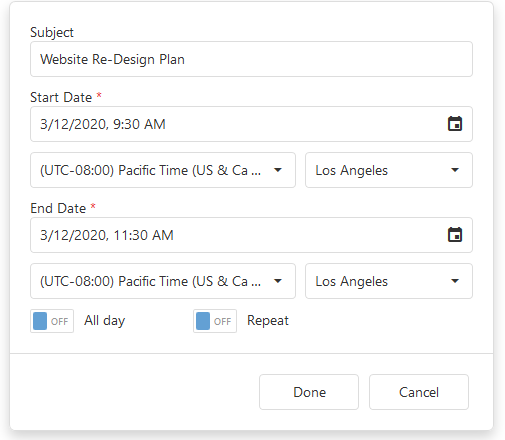
If this property is enabled, the appointment edit form is extended with drop-down menus that specify the start and end time zones and regions:
allowUpdating
Specifies whether or not an end user can change appointment properties.
Type:
Default Value: true
popup
Configures the Popup component that contains the Scheduler appointment edit form.
Selector: Popup
Type:

 Select one or more answers