DevExtreme jQuery/JS - Licensing
You must purchase a license to use DevExtreme UI components/libraries within a software project. If you are ready to incorporate DevExtreme UI components/libraries in your project, please visit the DevExtreme Purchase page for pricing options.
Developer Express Inc. licenses DevExtreme on a per-developer basis. Each developer who uses DevExtreme must purchase or obtain a license. If your organization owns multiple licenses, you can assign them to individual developers. After a license is assigned, the developer can access a personal license key in the DevExpress Download Manager through their DevExpress account.
If a developer leaves or stops using DevExtreme, you can revoke their license and reassign it.
DevExpress checks the license status to determine whether a valid DevExtreme license is available. If you do not have a valid DevExtreme license, an error message is displayed. To complete the license verification process, you must supply a valid license key.
The process involves two steps:
- Obtain your DevExpress license key from the Download Manager and register it on your machine.
- Use the
devextreme-licenseCLI tool to generate a DevExtreme-compatible runtime key and register it in your application.
Regardless of the distribution channel you use — NuGet, npm, yarn, CDN — you must complete both steps above.
For complete setup instructions, refer to: License Key for DevExpress Products
Evaluation (Trial)
Per the terms of the End User License Agreement (EULA), you are permitted to evaluate DevExtreme components for 30-days.
During the 30-day trial period, an on-screen message and console warning indicate that you are using an unlicensed version of DevExtreme. To remove these messages and use DevExtreme components in production projects, purchase a commercial license. To purchase a license, visit the DevExtreme Purchase page. For assistance, you can contact the DevExpress Client Services Team.
Obtain and Register Your License Key
Log in to the DevExpress Download Manager to obtain your DevExpress license key.
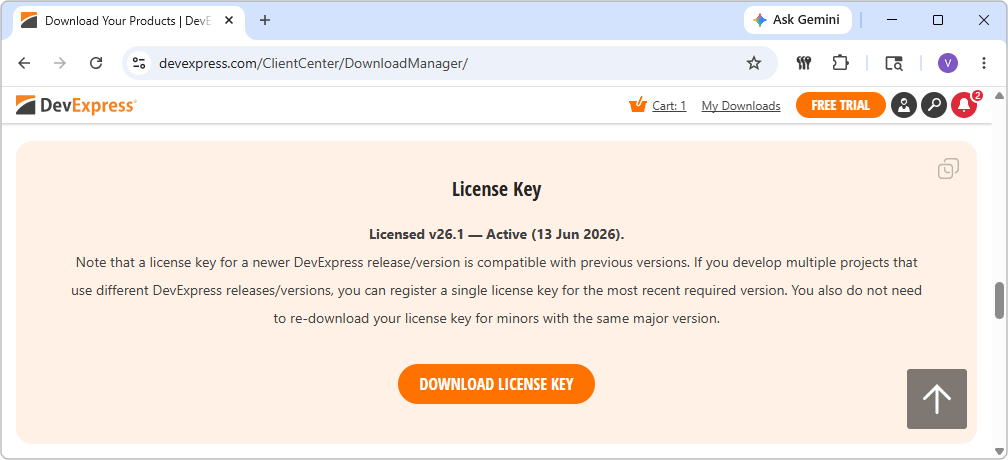
Register the key on your machine using one of the methods described in the License Key for DevExpress Products article.
Validate Your License Key
To use DevExtreme in a licensed project, register a valid license key in your application. The process involves two steps:
- Obtain and register your DevExpress license key from the DevExpress Download Manager.
- Use the
devextreme-licenseCLI tool to generate a DevExtreme-compatible runtime key and register it in your application.
For complete instructions for all supported frameworks and environments, refer to the following article:
License Key for DevExpress Products — Additional Step for JS/TS Developers (DevExtreme)
Migrate to the New Licensing Mechanism
DevExtreme v26.1 introduces a new licensing mechanism. Follow the steps below to migrate your application from an earlier version.
Applications that already follow the setup described in Validate Your License Key do not require application code changes.
Step 1: Register Your DevExpress License Key
Register your DevExpress license key on your machine using one of the methods described in License Key for DevExpress Products. If you already use other DevExpress products, the key is likely already installed. Update the key as usual when you upgrade to a new major version.
Step 2: Generate Runtime Key
The devextreme-license CLI reads your registered DevExpress key and generates a DevExtreme-compatible runtime key. Your application most likely already contains a file that stores this key. DevExtreme recommends the following file names and locations:
src/devextreme-license.ts— for modular applicationssrc/devextreme-license.js— for non-modular (<script>-based) applications
The runtime key file is typically excluded from version control using .gitignore.
Modular Applications
Add the following script to your package.json to automatically regenerate the runtime key file each build (update the --out path/extension to match your runtime key file):
{
  "scripts": {
    "prebuild": "devextreme-license --out src/devextreme-license.ts --force"
  }
}
The resulting file fully matches the format we recommend in the documentation, but contains the key in the new format.
jQuery / Non-Modular Applications
Run devextreme-license with the --non-modular flag:
devextreme-license --non-modular --out src/devextreme-license.js --force
The resulting file fully matches the format we recommend in the documentation, but contains the key in the new format.
Verify that the generated file is included using a <script> tag:
<script src="./src/devextreme-license.js" type="text/javascript"></script>
Step 3: Verify Your Application
In most cases, no application code changes are required. Verify that the runtime key is read from the correct file in the location where you pass it to DevExpress.config(GlobalConfig).
If you previously used your license key from a custom file, use the --out parameter to specify a custom file path, or run devextreme-license without parameters (it outputs the key directly to the CLI).
Step 4: Configure CI/CD
For CI/CD environments, the prebuild script added in Step 2 is sufficient on the build side, but you must also set your DevExpress license key in an environment variable on the build server. For complete instructions, see Deployment and Continuous Integration (CI).
Deployment and Continuous Integration (CI)
You must have a valid license to distribute applications that use DevExtreme components. Our End User License Agreement (EULA) lists the resources and files that can be redistributed to your application users.
To add DevExtreme license verification to your CI/CD processes, run the devextreme-license CLI tool in a pre-build step. The tool reads your DevExpress license key from an environment variable and generates a DevExtreme-compatible runtime key file.
For full instructions, including an example for GitHub Actions and Secrets, refer to the following article:
License Key for DevExpress Products — CI/CD Systems
devextreme-license CLI generates the runtime key file separately. If you prefer not to associate build servers with a specific employee key, you can purchase a dedicated CI license. However, a dedicated key is not required if you have purchased a license for each developer who uses DevExtreme.Updating License Keys
For information on version-specific license key requirements and how to update your key when upgrading DevExtreme, refer to:
Information Security
The DevExtreme license key does not contain secret or private information. During license validation, Developer Express Inc does not access any personal data/resources, nor do we collect information about individual users/devices. DevExtreme license validation does not send any data to Developer Express Inc servers, does not collect information about users, and does not send any information to third parties.
License key validation is performed on the client and is not machine-based. Since DevExtreme does not send any HTTP requests during validation, no network connection is required to validate a given license.
License key validation is the same for both a local development machine or a CI/CD system.
Validation
When creating the first component, DevExtreme checks the license key specified in the config() method. If license key verification is successful, additional license-related messages are not shown within the browser console or on-screen.
If license key validation fails, DevExtreme displays warning messages in the browser console at runtime. If the devextreme-license CLI cannot generate a runtime key, it reports errors directly in the CLI output. For a full list of error codes and their descriptions, refer to:

 Select one or more answers