Angular Scheduler - Appointment Edit Form
The appointment edit form allows users to modify or add appointments to the Scheduler's data source. The form contains two groups: the general information group (mainGroup) and the recurrence settings group (recurrenceGroup). Scheduler initially displays mainGroup and switches to the recurrenceGroup when users modify the "Repeat" drop-down value.
Rearrange Form Items
Configure editing.form.items[] to customize the appointment edit form layout. To preserve the form's switching functionality between mainGroup and recurrenceGroup, add the groups as group items in the items[] root:
jQuery
$('#scheduler').dxScheduler({
    editing: {
        form: {
            items: [{
                name: 'mainGroup',
                itemType: 'group',
            }, {
                name: 'recurrenceGroup',
                itemType: 'group',
            }],
        },
    },
});
Angular
<dx-scheduler>
    <dxo-scheduler-editing>
        <dxo-editing-form>
            <dxi-form-item
                name="mainGroup"
                itemType="group"
            ></dxi-form-item>
            <dxi-form-item
                name="recurrenceGroup"
                itemType="group"
            ></dxi-form-item>
        </dxo-editing-form>
    </dxo-scheduler-editing>
</dx-scheduler>
Vue
<template>
    <DxScheduler>
        <DxEditing>
            <DxForm>
                <DxItem
                    name="mainGroup"
                    itemType="group"
                />
                <DxItem
                    name="recurrenceGroup"
                    itemType="group"
                />
            </DxForm>
        </DxEditing>
    </DxScheduler>
</template>

<script setup lang="ts">
import { DxScheduler, DxEditing, DxForm, DxItem } from 'devextreme-vue/scheduler';

</script>
React
import { Scheduler, Editing, Form, Item } from 'devextreme-react/scheduler';

function App() {
    return (
        <Scheduler>
            <Editing>
                <Form>
                    <Item
                        name="mainGroup"
                        itemType="group"
                    />
                    <Item
                        name="recurrenceGroup"
                        itemType="group"
                    />
                </Form>
            </Editing>
        </Scheduler>
    );
};
To add a resource field editor to items[], use the resource fieldExpr in an item name as follows:
jQuery
$('#scheduler').dxScheduler({
    resources: [{
        fieldExpr: 'priorityId'
    }],
    editing: {
        form: {
            items: [{
                name: 'mainGroup',
                itemType: 'group',
                items: [{
                    name: 'priorityIdGroup',
                    itemType: 'group',
                    items: ['priorityIdIcon', 'priorityIdEditor']
                }],
            }, ... ],
        },
    },
});
Angular
<dx-scheduler>
    <dxo-scheduler-editing>
        <dxo-editing-form>
            <dxi-form-item
                name="mainGroup"
                itemType="group"
            >
                <dxi-form-item
                    name="priorityIdGroup"
                    itemType="group"
                >
                    <dxi-form-item name="priorityIdIcon"></dxi-form-item>
                    <dxi-form-item name="priorityIdEditor"></dxi-form-item>
                </dxi-form-item>
            </dxi-form-item>
        </dxo-editing-form>
    </dxo-scheduler-editing>
</dx-scheduler>
Vue
<template>
    <DxScheduler>
        <DxEditing>
            <DxForm>
                <DxItem
                    name="mainGroup"
                    itemType="group"
                >
                    <DxItem
                        name="priorityIdGroup"
                        itemType="group"
                    >
                        <DxItem name="priorityIdIcon" />
                        <DxItem name="priorityIdEditor" />
                    </DxItem>
                </DxItem>
            </DxForm>
        </DxEditing>
    </DxScheduler>
</template>

<script setup lang="ts">
import { DxScheduler, DxEditing, DxForm, DxItem } from 'devextreme-vue/scheduler';

</script>
React
import { Scheduler, Editing, Form, Item } from 'devextreme-react/scheduler';

function App() {
    return (
        <Scheduler>
            <Editing>
                <Form>
                    <Item
                        name="mainGroup"
                        itemType="group"
                    >
                        <Item
                            name="priorityIdGroup"
                            itemType="group"
                        >
                            <Item name="priorityIdIcon" />
                            <Item name="priorityIdEditor" />
                        </Item>
                    </Item>
                </Form>
            </Editing>
        </Scheduler>
    );
};
Customize the Appointment Edit Form
To customize individual appointment edit form items, implement the onAppointmentFormOpening handler. The following code snippet uses AppointmentFormOpeningEvent.form to disable the subjectEditor input and enable isRequired for the descriptionEditor item:
jQuery
$('#scheduler').dxScheduler({
    onAppointmentFormOpening(e) {
        e.form.getEditor('subjectEditor').option('disabled', true);
        e.form.itemOption('mainGroup.descriptionGroup.descriptionEditor', 'isRequired', true);
    },
});
Angular
<dx-scheduler ...
    (onAppointmentFormOpening)="handleAppointmentFormOpening($event)"
></dx-scheduler>
import { type DxSchedulerTypes } from "devextreme-angular/ui/scheduler";
// ...
export class AppComponent {
    handleAppointmentFormOpening(e: DxSchedulerTypes.AppointmentFormOpeningEvent) {
        e.form.getEditor('subjectEditor').option('disabled', true);
        e.form.itemOption('mainGroup.descriptionGroup.descriptionEditor', 'isRequired', true);
    }
}
Vue
<template>
    <DxScheduler ...
        @appointment-form-opening="handleAppointmentFormOpening"
    />
</template>

<script setup lang="ts">
import { DxScheduler, type DxSchedulerTypes } from 'devextreme-vue/scheduler';

function handleAppointmentFormOpening(e: DxSchedulerTypes.AppointmentFormOpeningEvent) {
    e.form.getEditor('subjectEditor').option('disabled', true);
    e.form.itemOption('mainGroup.descriptionGroup.descriptionEditor', 'isRequired', true);
}

</script>
React
import { Scheduler, type SchedulerTypes } from 'devextreme-react/scheduler';

function handleAppointmentFormOpening(e: SchedulerTypes.AppointmentFormOpeningEvent) {
    e.form.getEditor('subjectEditor').option('disabled', true);
    e.form.itemOption('mainGroup.descriptionGroup.descriptionEditor', 'isRequired', true);
}

function App() {
    return (
        <Scheduler ...
            onAppointmentFormOpening={handleAppointmentFormOpening}
        />
    );
};To customize the appointment edit form further, specify the editing.form and editing.popup configuration objects. These objects configure the appointment edit form's Popup and Form components. The following code snippet increases the width of the Popup and sets the "static" label mode for the Form:
jQuery
$('#scheduler').dxScheduler({
    editing: {
        popup: {
            width: '50vw',
        },
        form: {
            labelMode: 'static',
        },
    },
});
Angular
<dx-scheduler>
    <dxo-scheduler-editing>
        <dxo-editing-popup
            width="50vw"
        ></dxo-editing-popup>
        <dxo-editing-form
            labelMode="static"
        ></dxo-editing-form>
    </dxo-scheduler-editing>
</dx-scheduler>
Vue
<template>
    <DxScheduler>
        <DxEditing>
            <DxPopup width="50vw" />
            <DxForm labelMode="static" />
        </DxEditing>
    </DxScheduler>
</template>

<script setup lang="ts">
import { DxScheduler, DxEditing, DxForm, DxPopup } from 'devextreme-vue/scheduler';

</script>
React
import { Scheduler, Editing, Form, Popup } from 'devextreme-react/scheduler';

function App() {
    return (
        <Scheduler>
            <Editing>
                <Form width="50vw" />
                <Popup labelMode="static" />
            </Editing>
        </Scheduler>
    );
};
Predefined Items
The appointment edit form includes multiple predefined items. To integrate these, assign predefined item names to SimpleItem/GroupItem objects in the editing.form.items array. You can customize predefined items in their SimpleItem/GroupItem objects. To integrate predefined items without customization, add item names as strings.
The following predefined items are available:
editing.form.items
├─ mainGroup
|  ├─ subjectGroup
|  │  ├─ subjectIcon
|  │  └─ subjectEditor
|  ├─ dateGroup
|  │  ├─ dateIcon
|  |  └─ dateOptionsGroup
|  │     ├─ allDayEditor
|  │     ├─ startDateGroup
|  │     │  ├─ startDateTimeGroup
|  │     │  │  ├─ startDateEditor
|  │     │  │  └─ startTimeEditor
|  │     │  └─ startDateTimezoneEditor
|  │     └─ endDateGroup
|  │        ├─ endDateTimeGroup
|  │        │  ├─ endDateEditor
|  │        │  └─ endTimeEditor
|  │        └─ endDateTimezoneEditor
|  ├─ repeatGroup
|  │  ├─ repeatIcon
|  │  └─ repeatEditor
|  ├─ resourcesGroup
|  │  └─ ...
|  └─ descriptionGroup
|     ├─ descriptionIcon
|     └─ descriptionEditor
└─ recurrenceGroup
   ├─ recurrenceStartDateGroup
   │  ├─ recurrenceStartDateIcon
   │  └─ recurrenceStartDateEditor
   ├─ recurrenceRuleGroup
   │  ├─ recurrenceRuleIcon
   │  └─ recurrencePatternGroup
   │     ├─ recurrenceRuleRepeatGroup
   │     |  ├─ recurrenceCountEditor
   │     |  └─ recurrencePeriodEditor
   │     └─ recurrenceDayOfYearGroup — recurrenceDaysOfWeekEditor — recurrenceDayOfMonthEditor
   │        ├─ recurrenceDayOfYearMonthEditor
   │        └─ recurrenceDayOfYearDayEditor
   └─ recurrenceEndGroup
      ├─ recurrenceEndIcon
      └─ recurrenceEndEditor
         ├─ recurrenceRepeatEndEditor
         └─ recurrenceEndEditorsGroup
            ├─ recurrenceEndSpacer
            ├─ recurrenceEndUntilEditor
            └─ recurrenceEndCountEditor
Items within resourcesGroup depend on resource fieldExpr and icon properties. Scheduler uses resource field expressions (for instance, "roomId") in item names as follows:
...
└─ resourcesGroup
   └─ roomIdGroup
      ├─ roomIdIcon
      └─ roomIdEditor
If no resource has an icon assigned, resourcesGroup contains the following items:
...
└─ resourcesGroup
   ├─ resourcesGroupIcon
   └─ resourceEditorsGroup
      ├─ roomIdEditor
      ├─ priorityIdEditor
      ├─ assigneeIdEditor
└─ ...The images below illustrate predefined items within each available group.
General Appointment Details
General appointment details are available in the mainGroup:
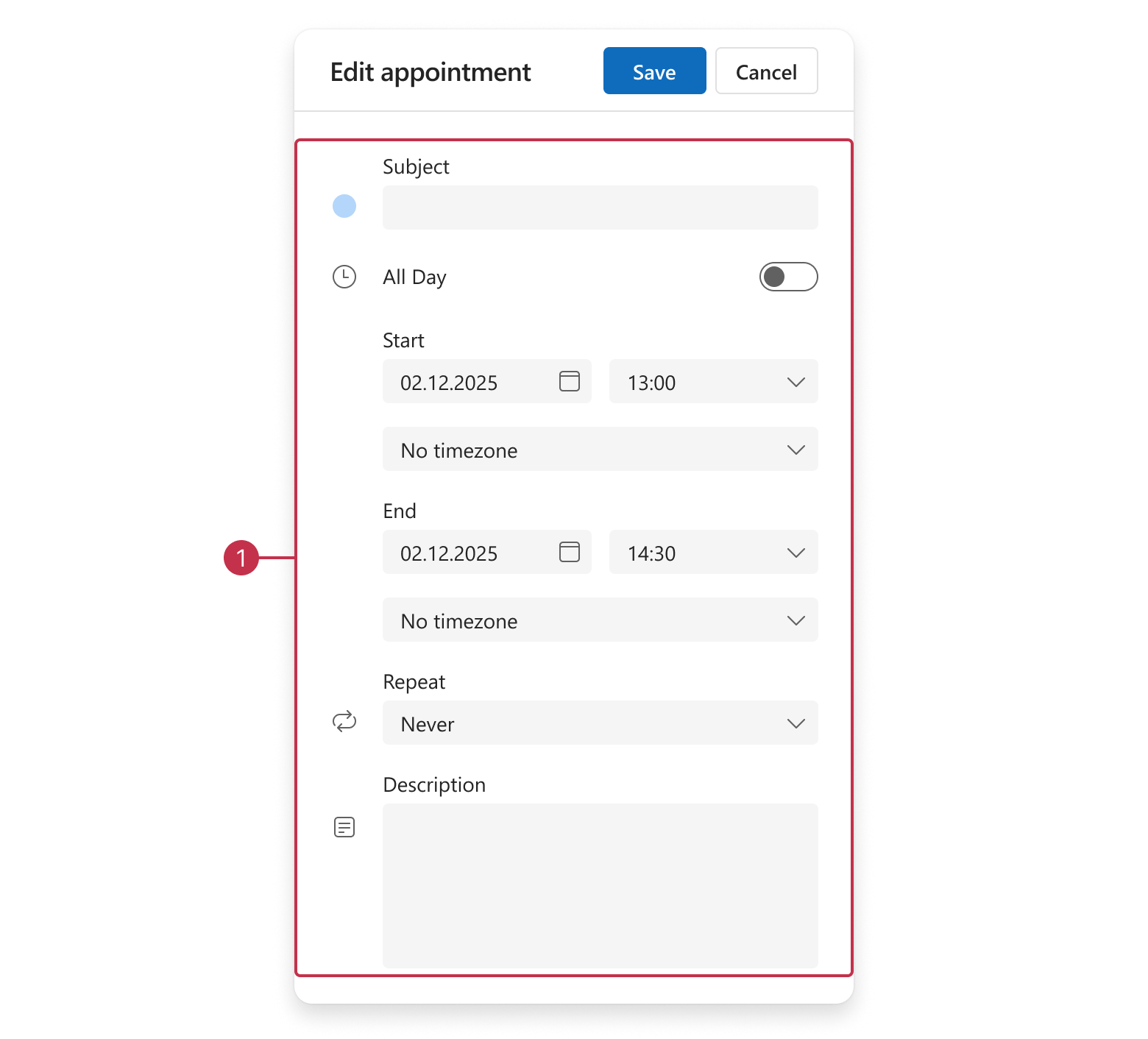
mainGroup
Appointment Recurrence Settings
Appointment recurrence settings are available in the recurrenceGroup:
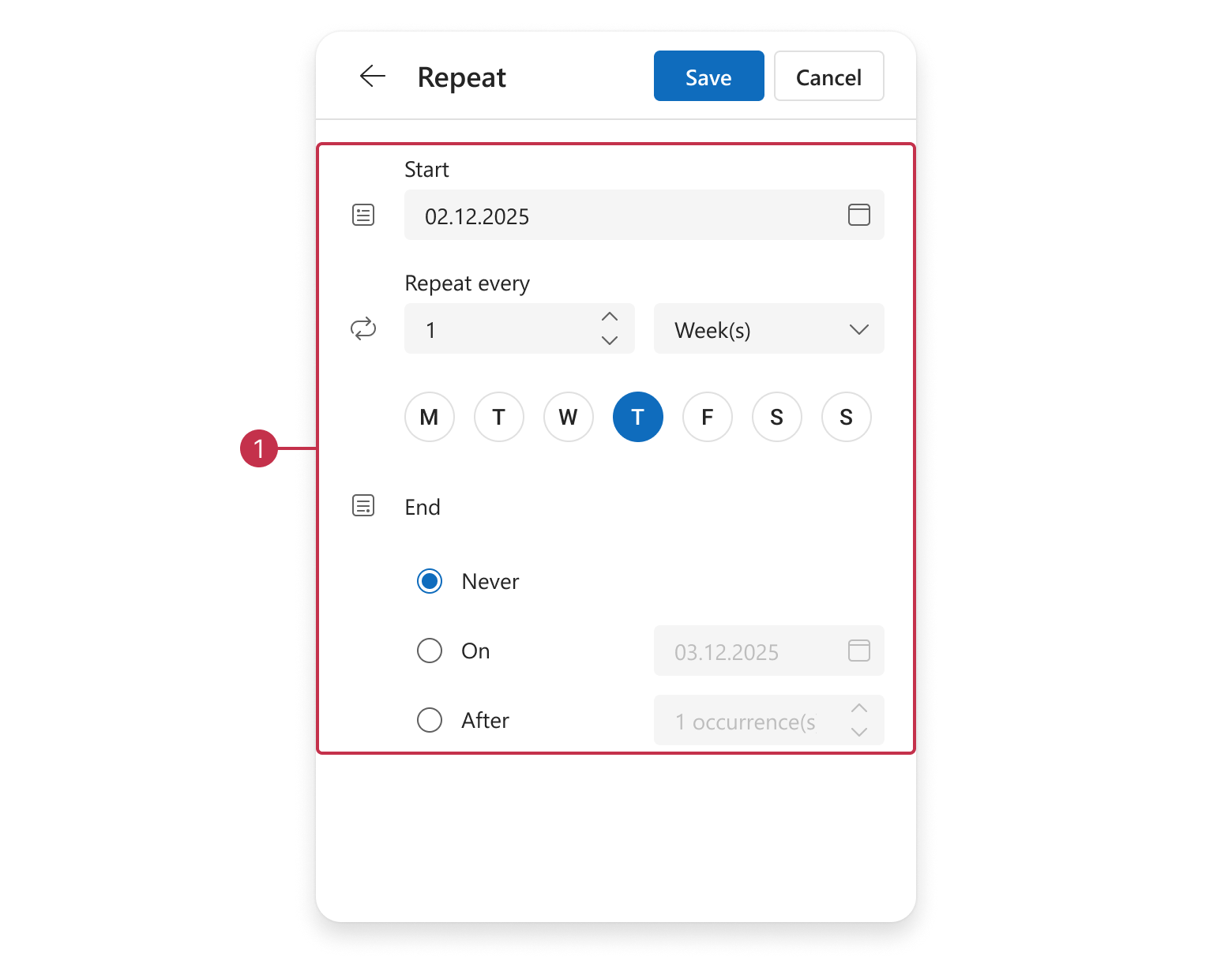
recurrenceGroup
Subject
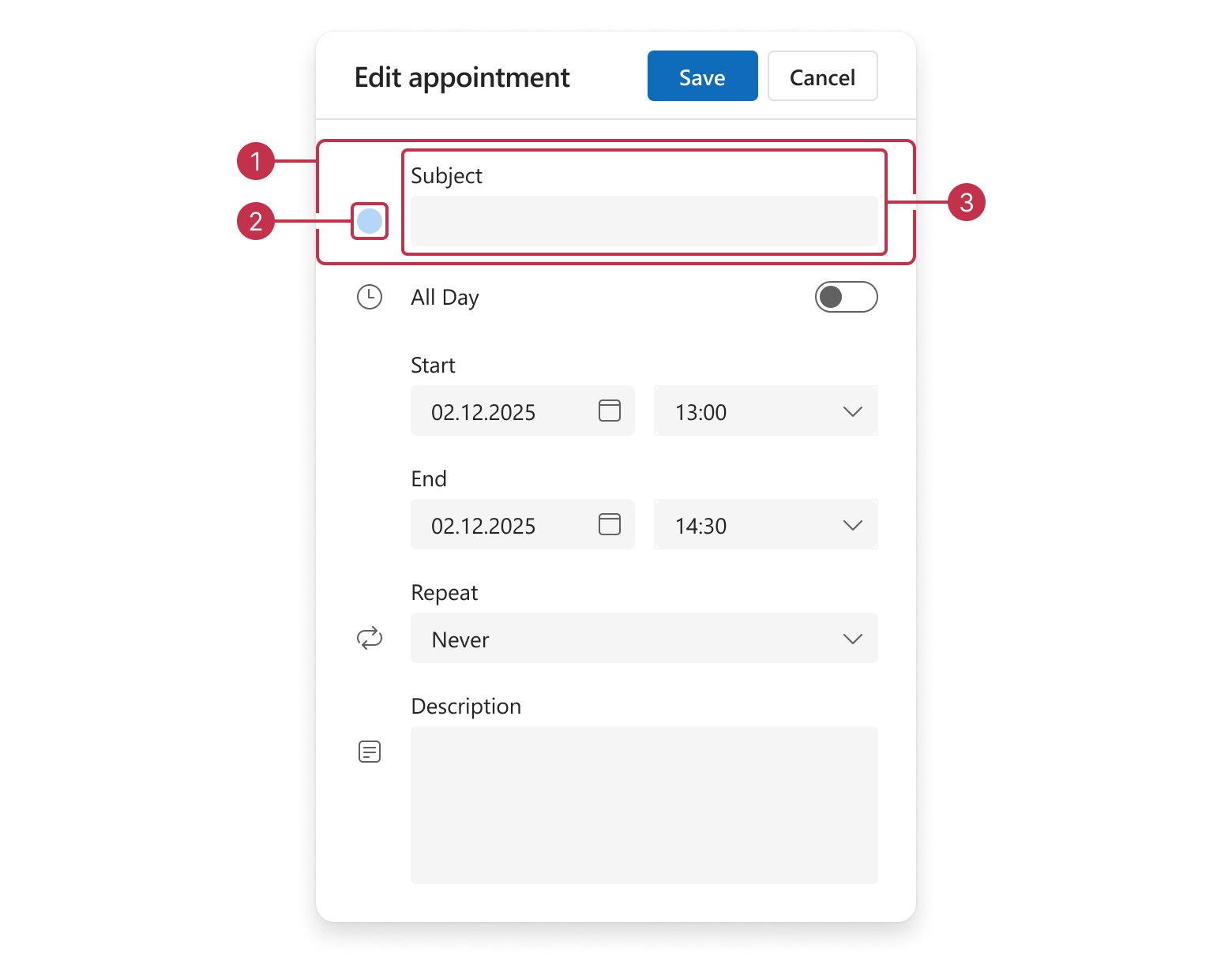
subjectGroupsubjectIconsubjectEditor
Date
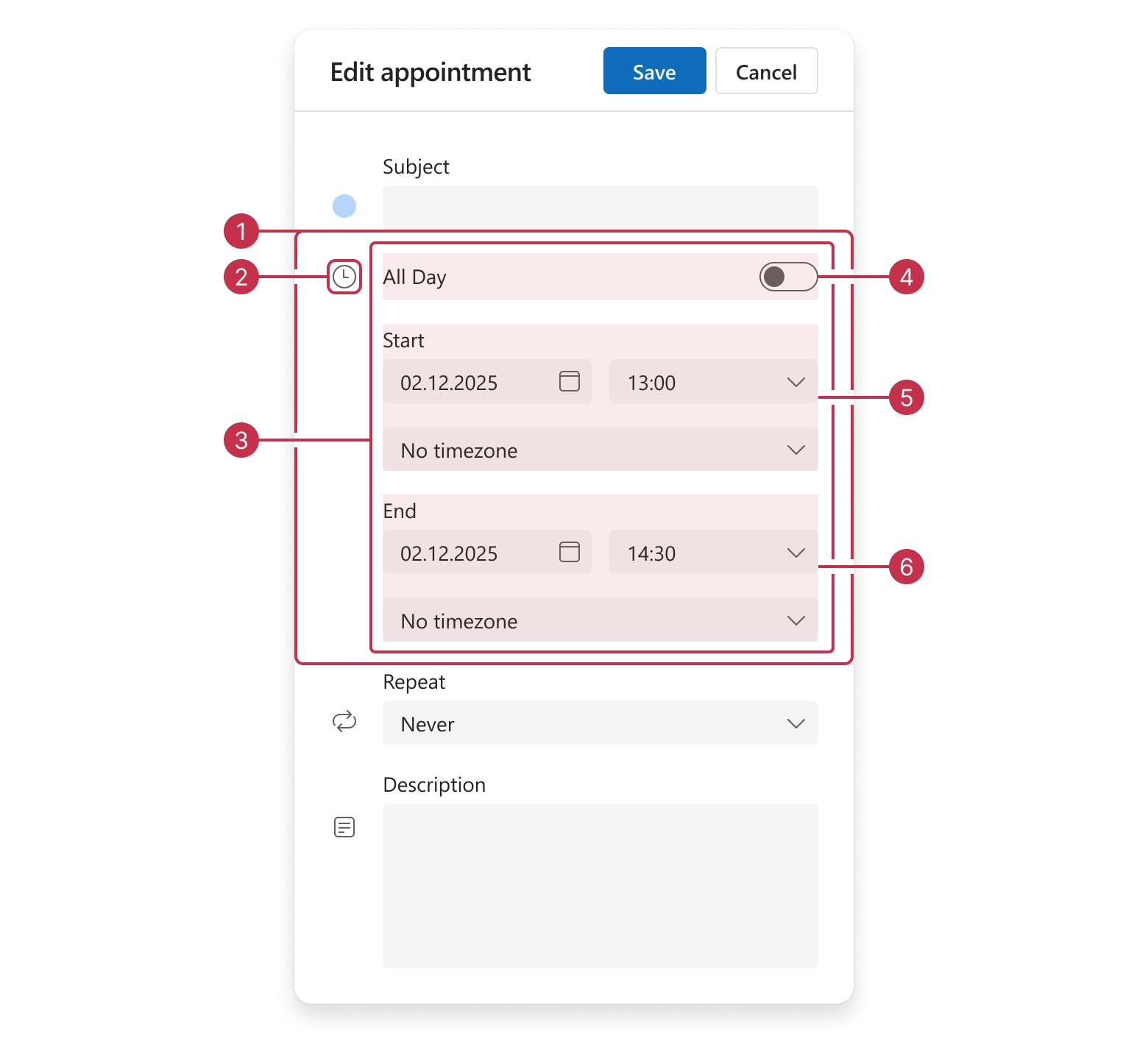
dateGroupdateIcondateOptionsGroupallDayEditorstartDateGroupendDateGroup
Recurrence
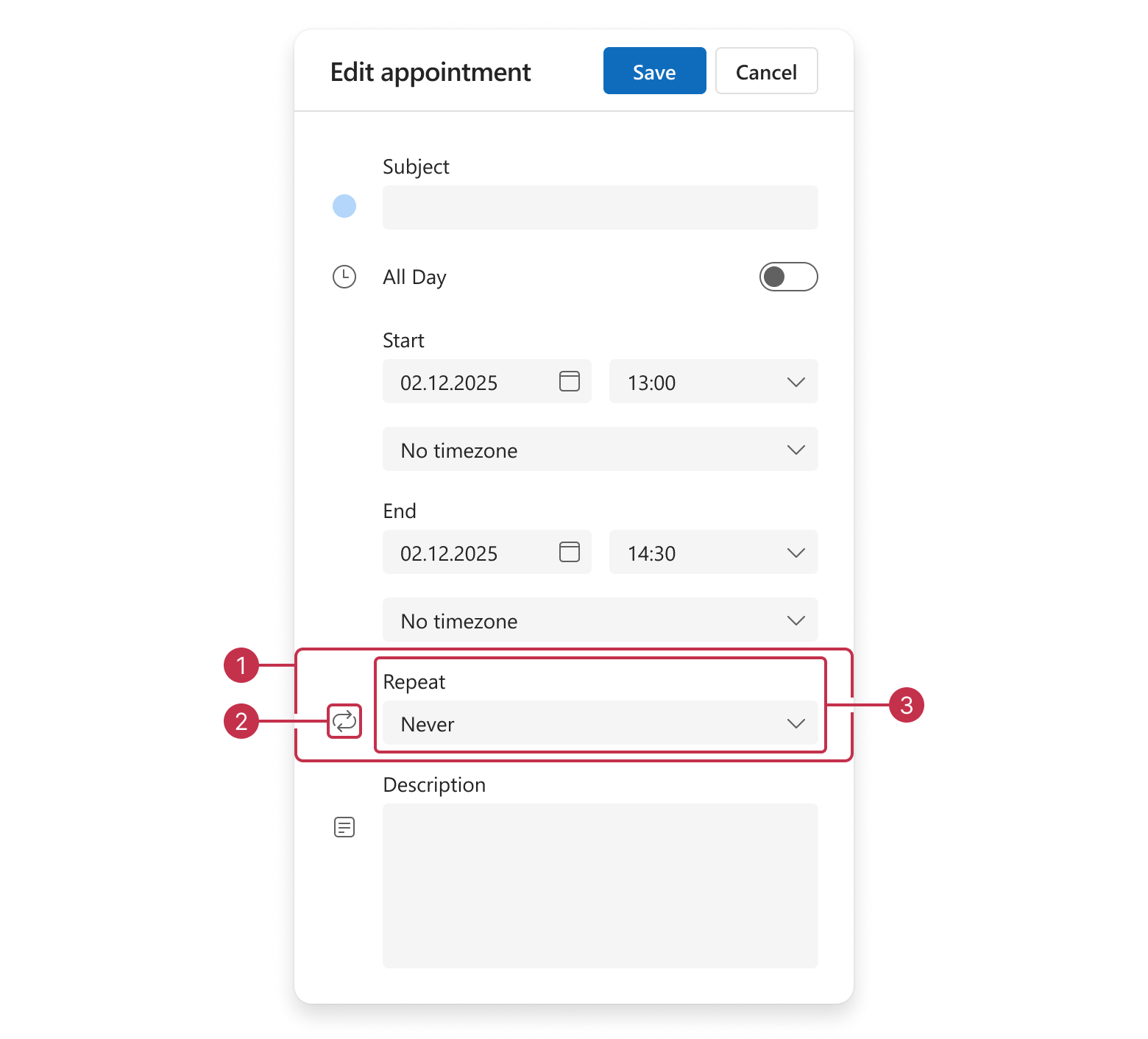
repeatGrouprepeatIconrepeatEditor
Resources
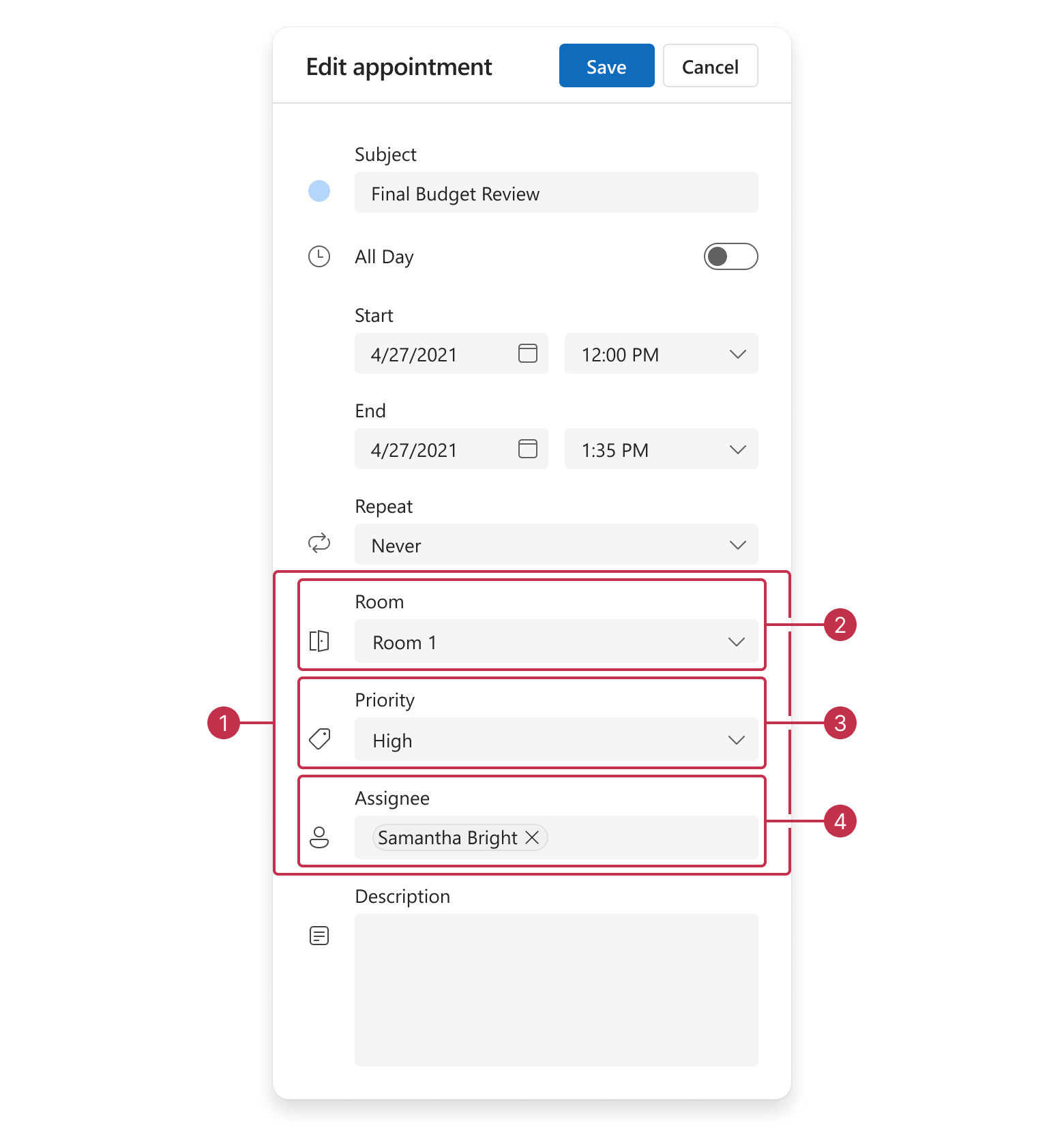
resourcesGrouproomIdGrouppriorityIdGroupassigneeIdGroup
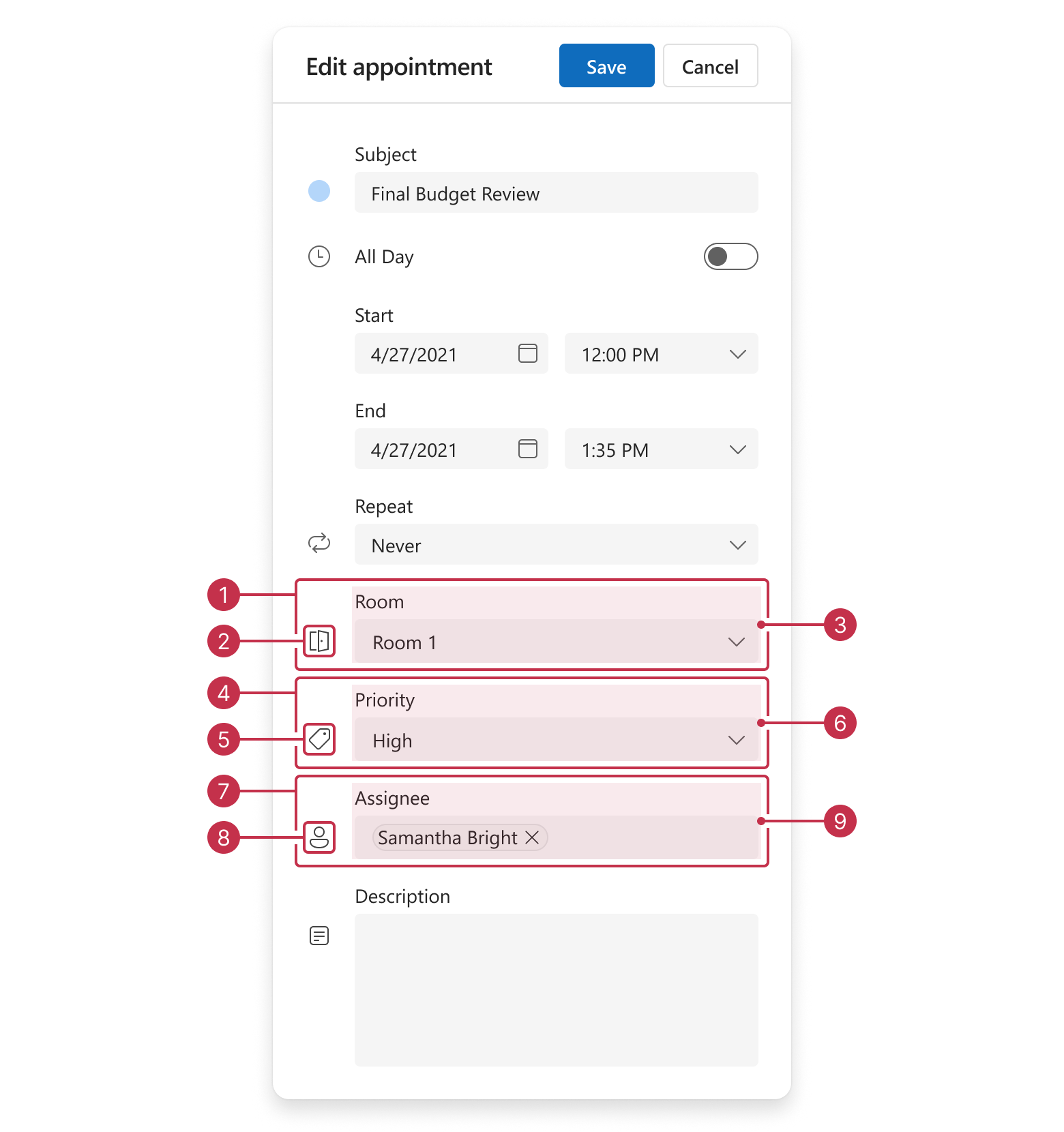
roomIdGrouproomIdIconroomIdEditorpriorityIdGrouppriorityIdIconpriorityIdEditorassigneeIdGroupassigneeIdIconassigneeIdEditor
The following image demonstrates a compact resourcesGroup layout:
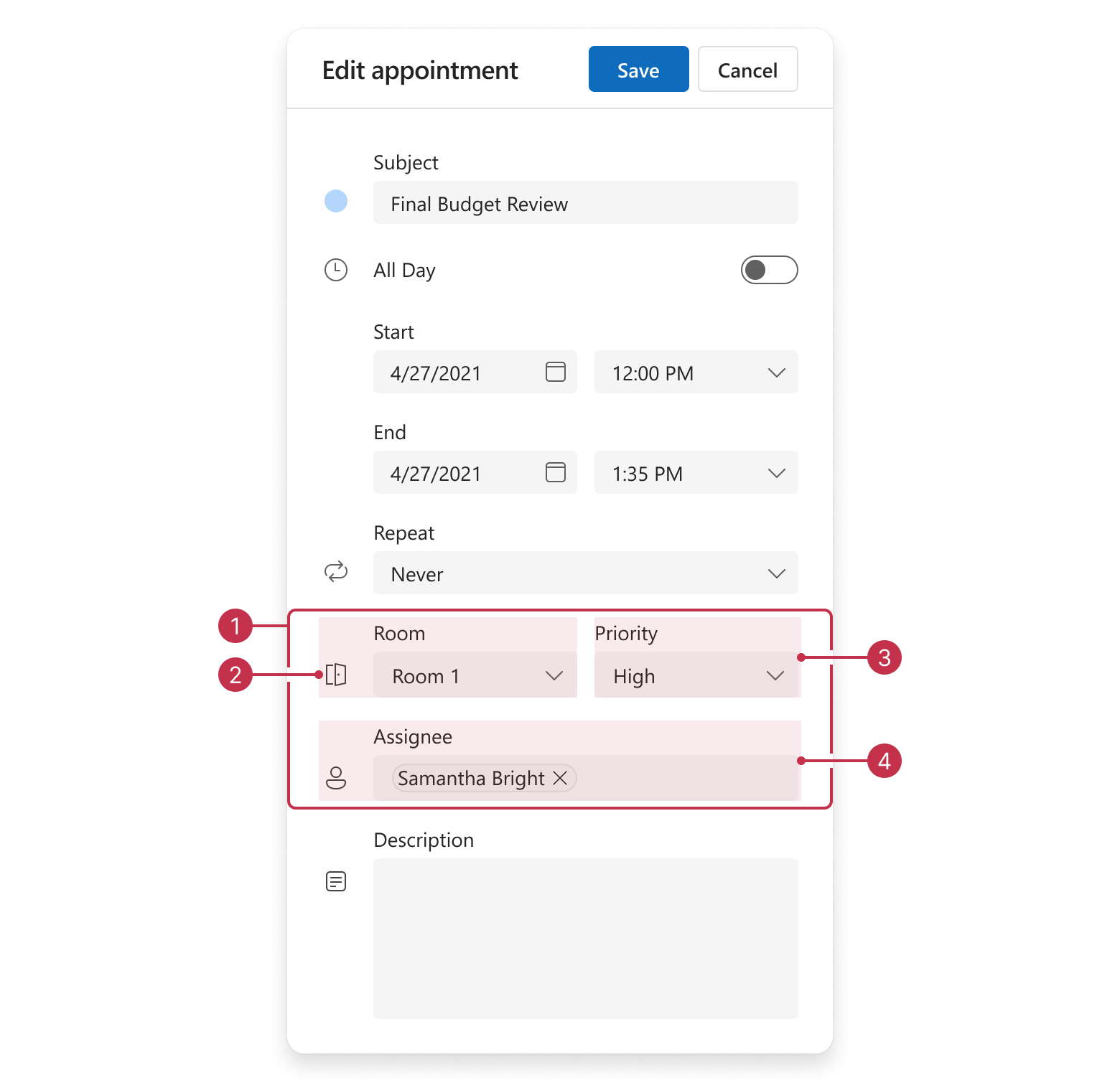
resourcesGrouproomIdGrouppriorityIdEditor
The following image demonstrates resourcesGroup items when no resource icons are specified:
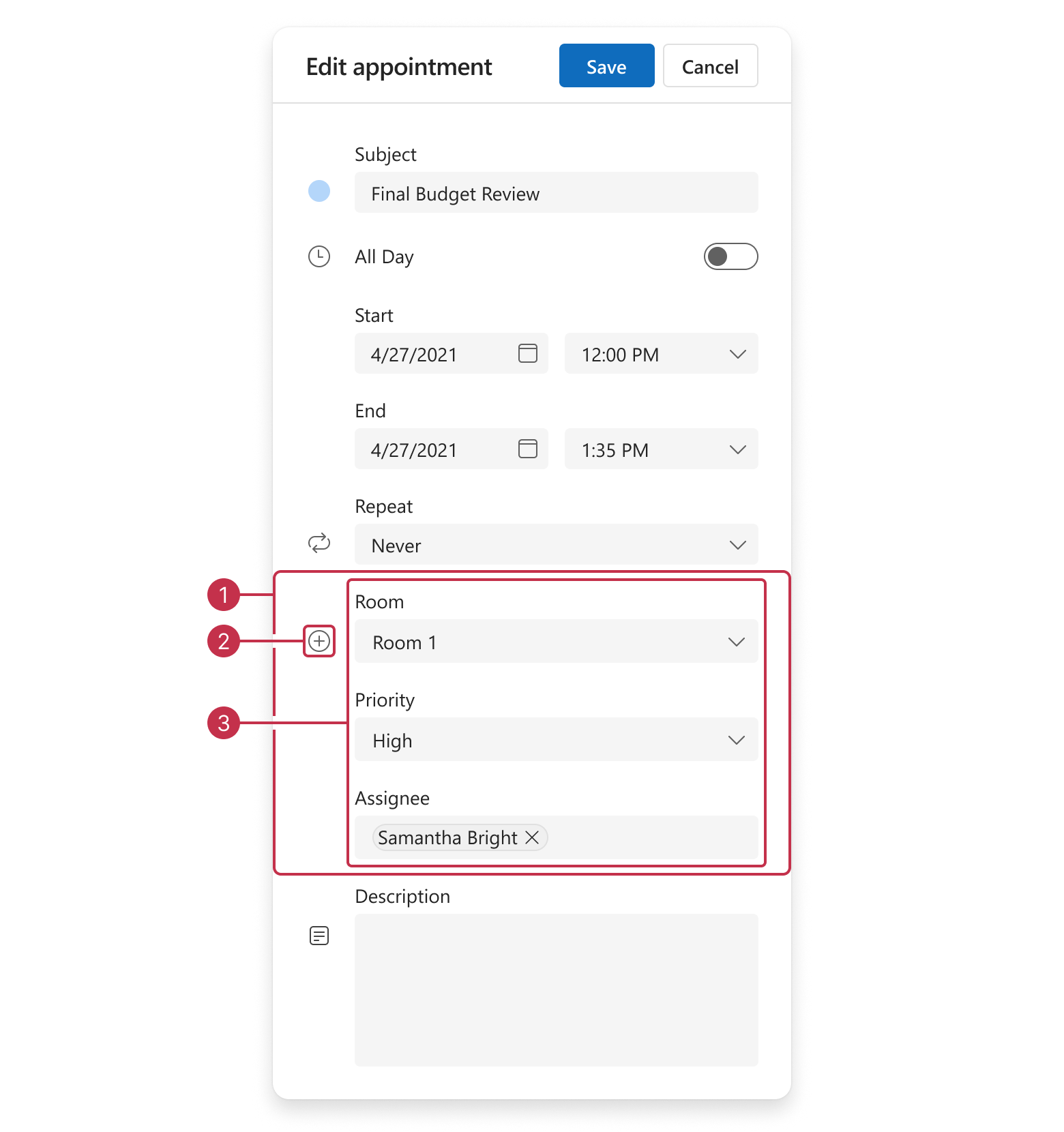
resourcesGroupresourcesGroupIconresourceEditorsGroup
Description
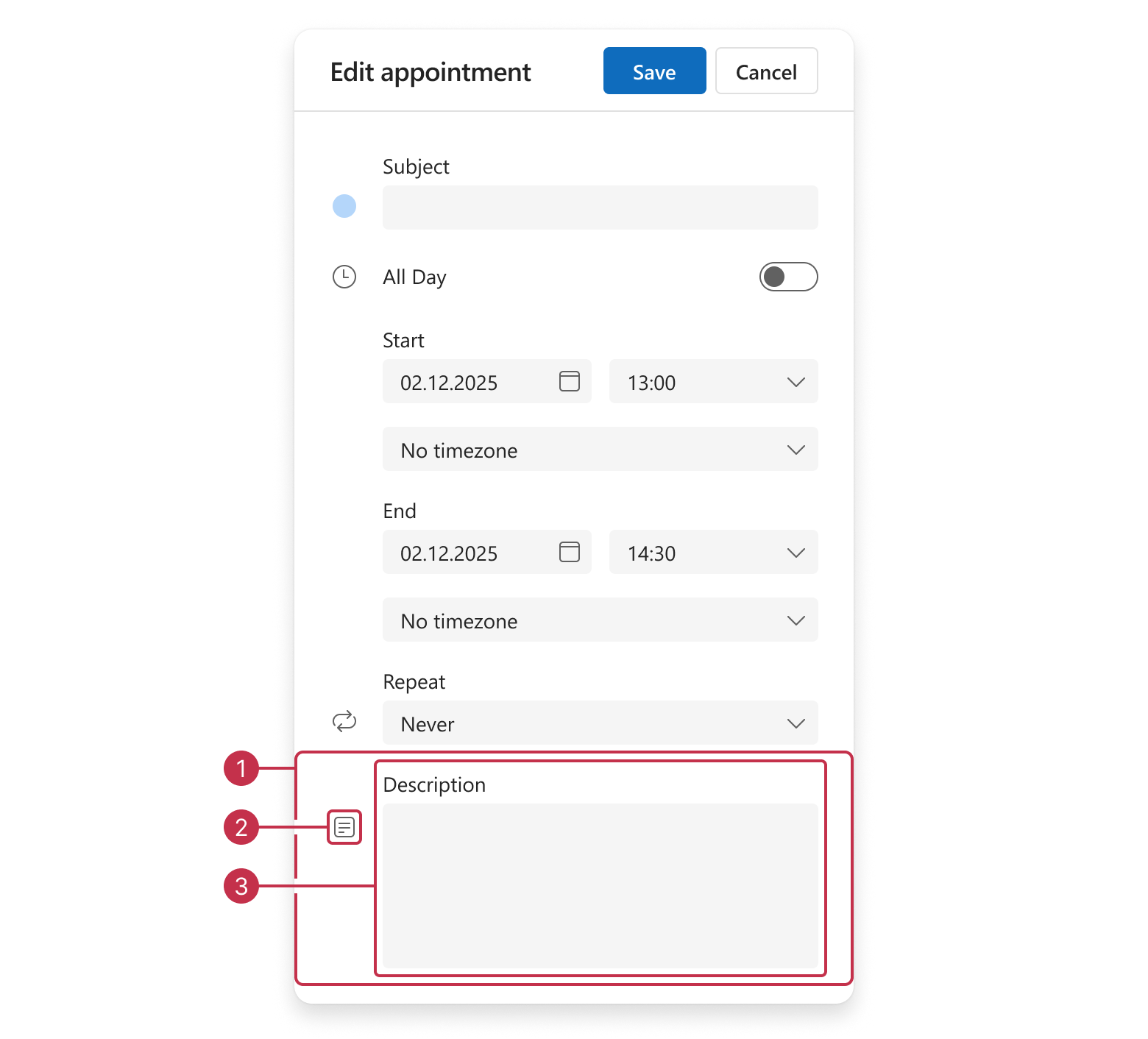
descriptionGroupdescriptionIcondescriptionEditor
Start Date
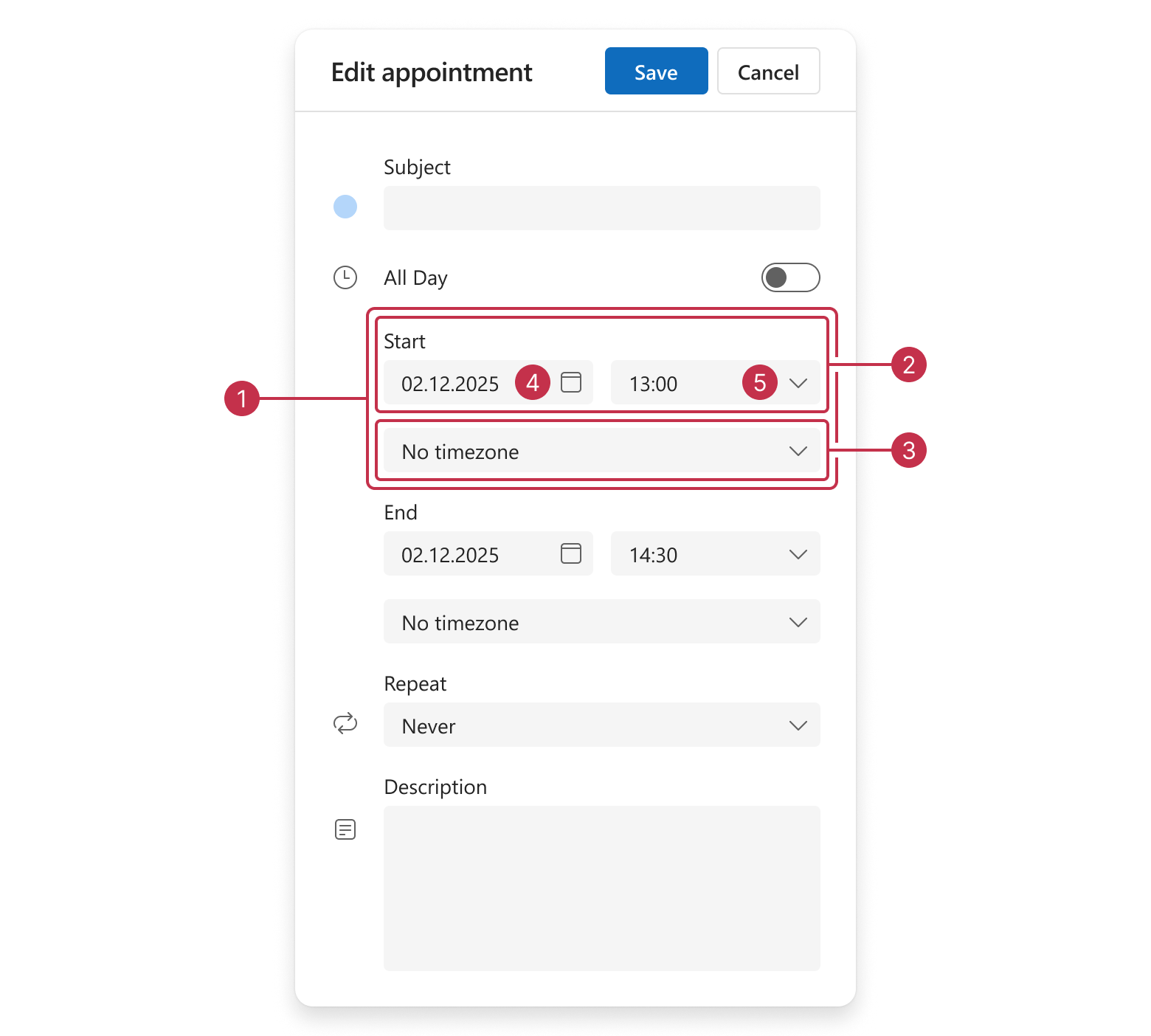
startDateGroupstartDateTimeGroupstartDateTimezoneEditorstartDateEditorstartTimeEditor
End Date
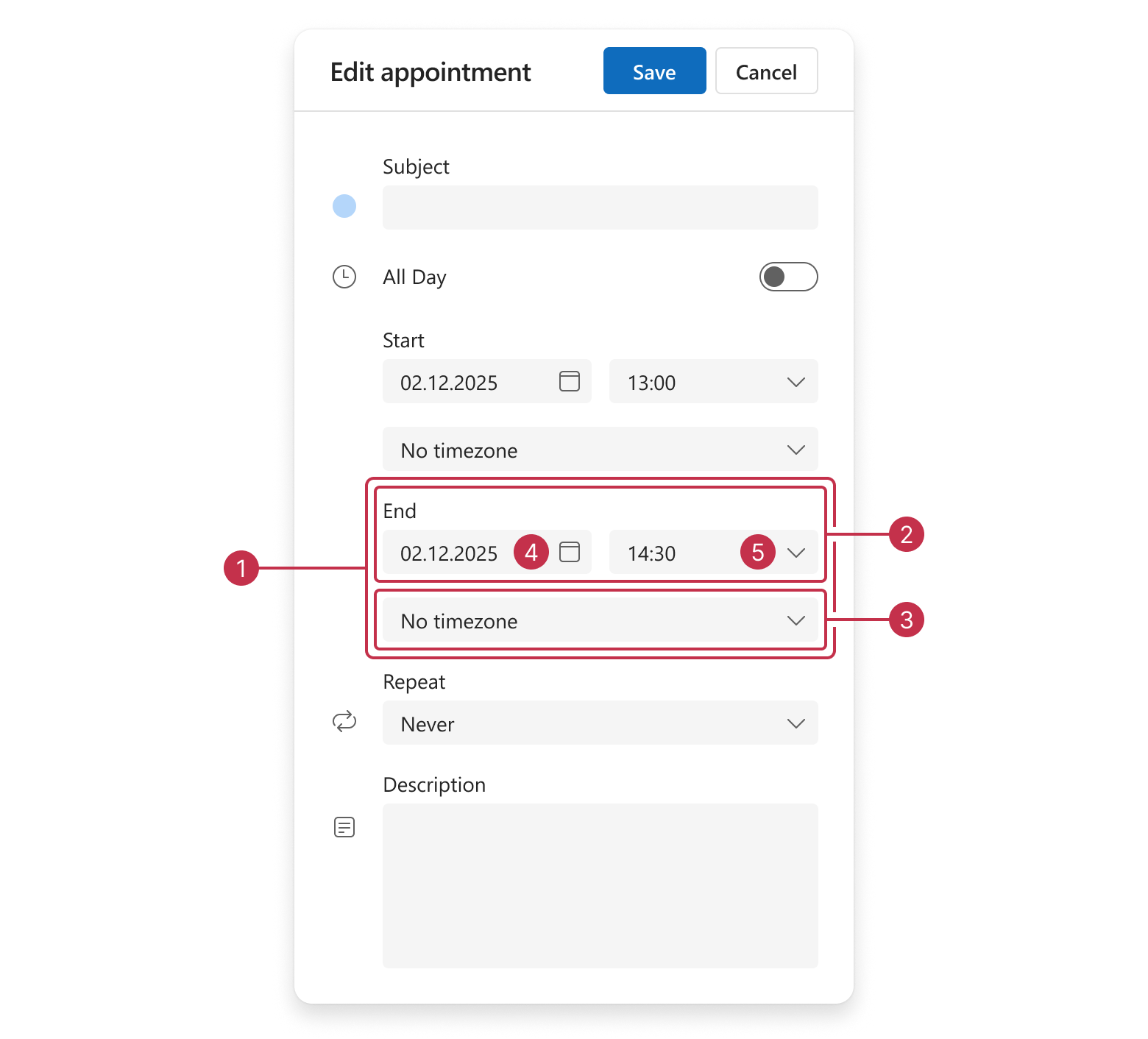
endDateGroupendDateTimeGroupendDateTimezoneEditorendDateEditorendTimeEditor
Recurrence Start Date
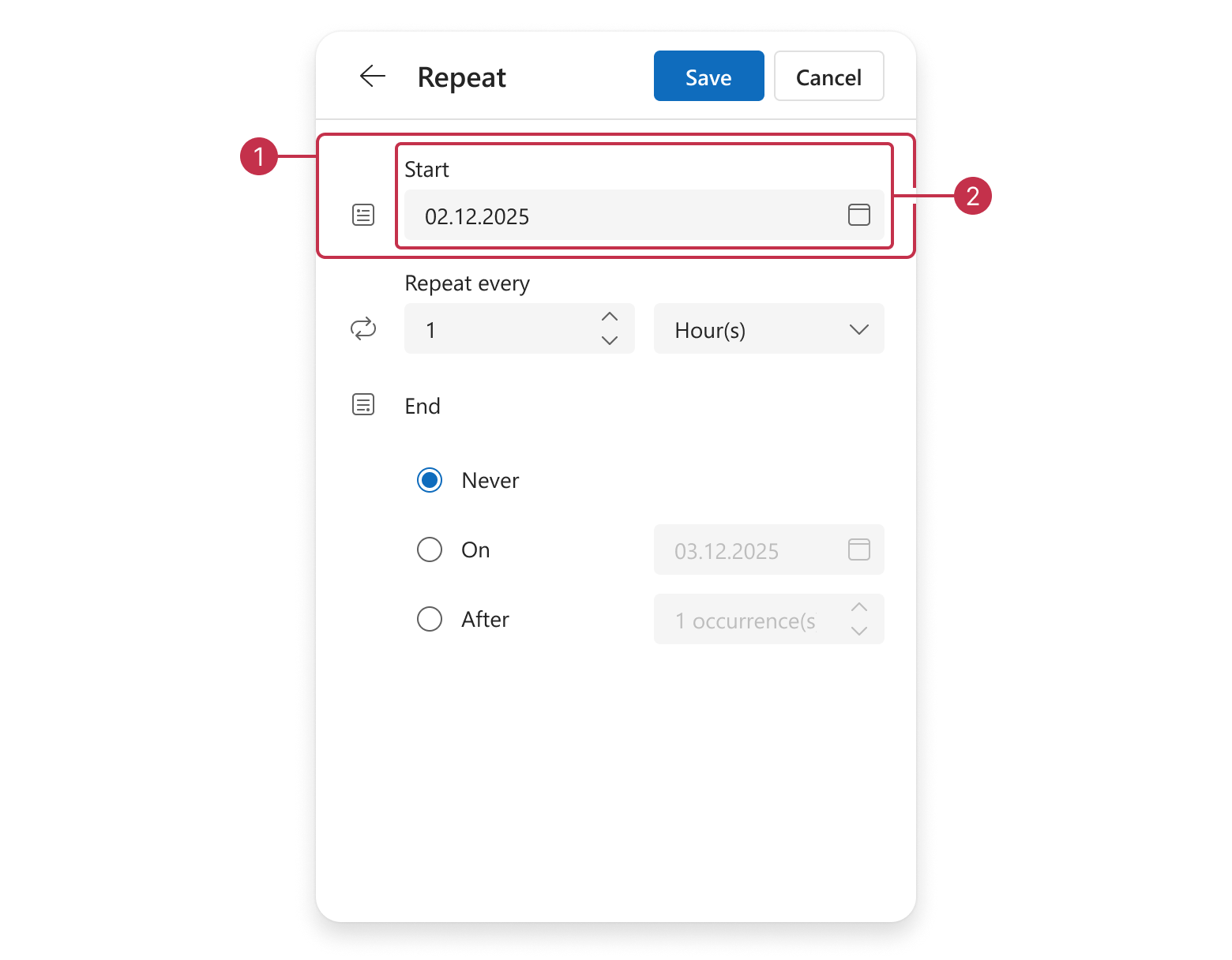
recurrenceStartDateGrouprecurrenceStartDateIconrecurrenceStartDateEditor
Recurrence Rules - Common Items
The following image demonstrates recurrenceRuleGroup items that are displayed in all recurrence modes:
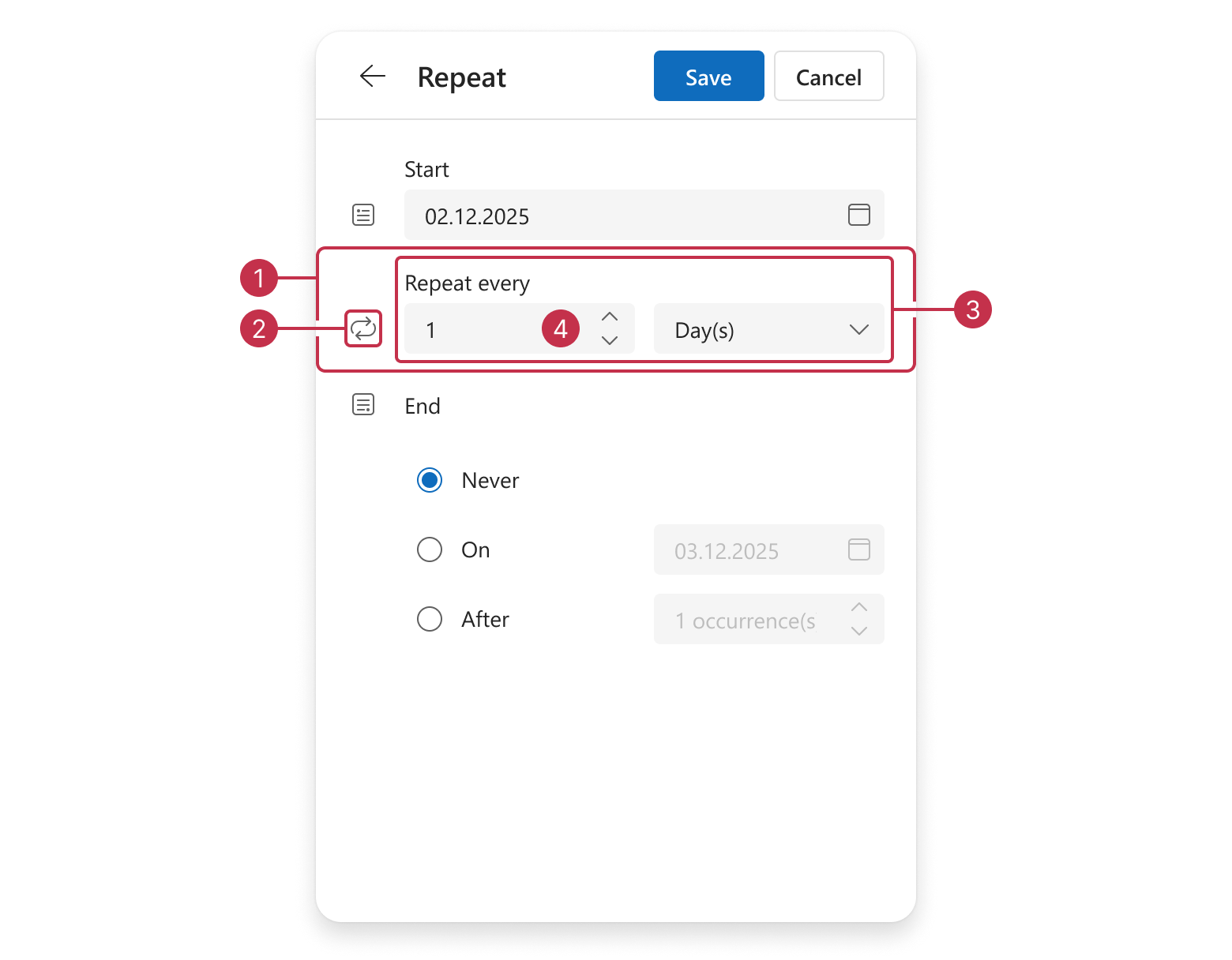
recurrenceRuleGrouprecurrenceRuleIconrecurrencePatternGroup
└─recurrenceRuleRepeatGrouprecurrenceCountEditor
recurrenceCountEditor is nested within recurrenceRuleRepeatGroup.Recurrence Rules - Mode-Specific Options
The following image demonstrates recurrenceRuleGroup items specific to each recurrence mode:
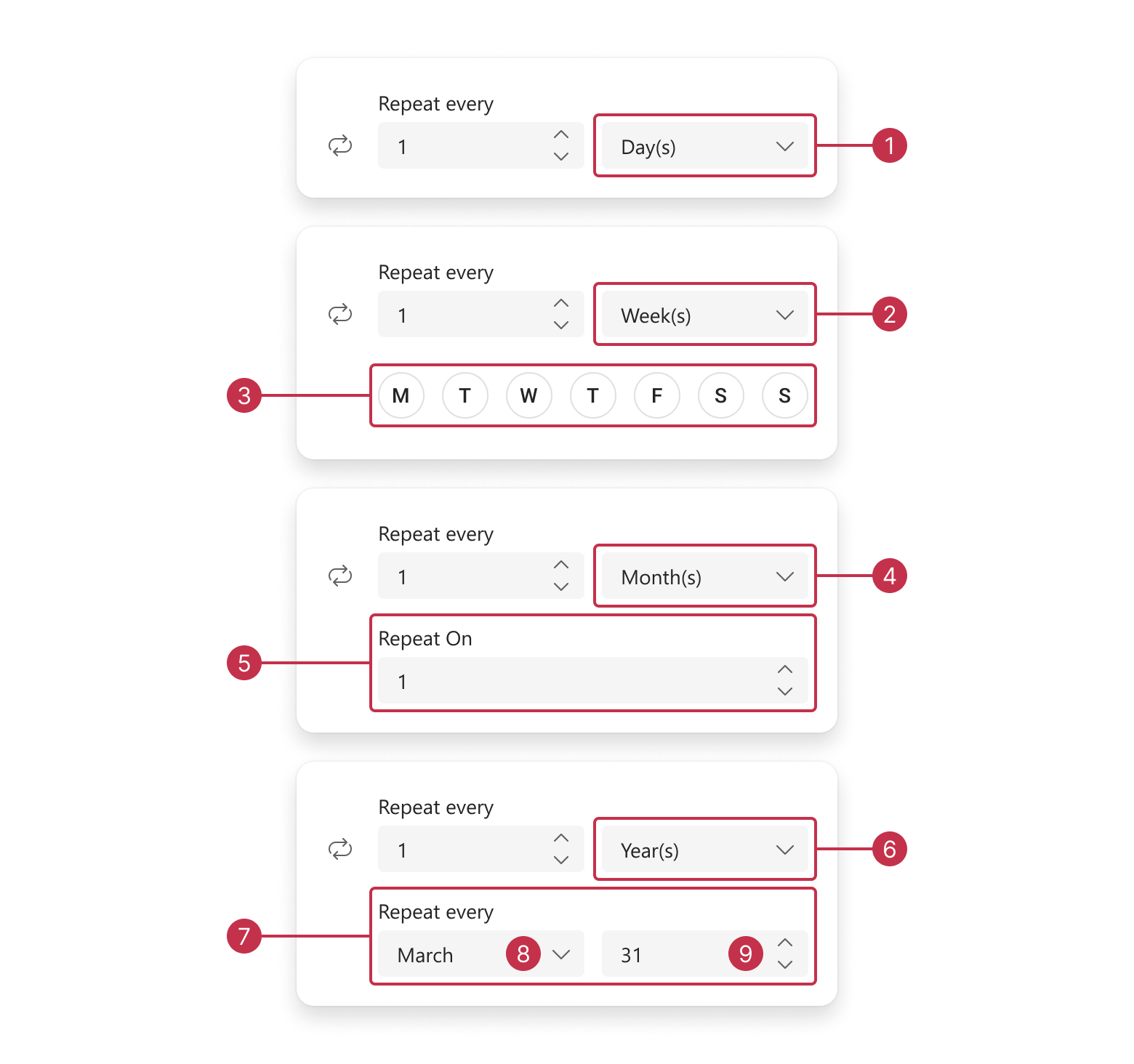
recurrencePeriodEditor- Daily Recurrence
ㅤrecurrencePeriodEditor- Weekly RecurrencerecurrenceDaysOfWeekEditor
ㅤrecurrencePeriodEditor- Monthly RecurrencerecurrenceDayOfMonthEditor
ㅤrecurrencePeriodEditor- Yearly RecurrencerecurrenceDayOfYearGrouprecurrenceDayOfYearMonthEditorrecurrenceDayOfYearDayEditor
recurrencePeriodEditor are nested within recurrencePatternGroup.Recurrence End Date
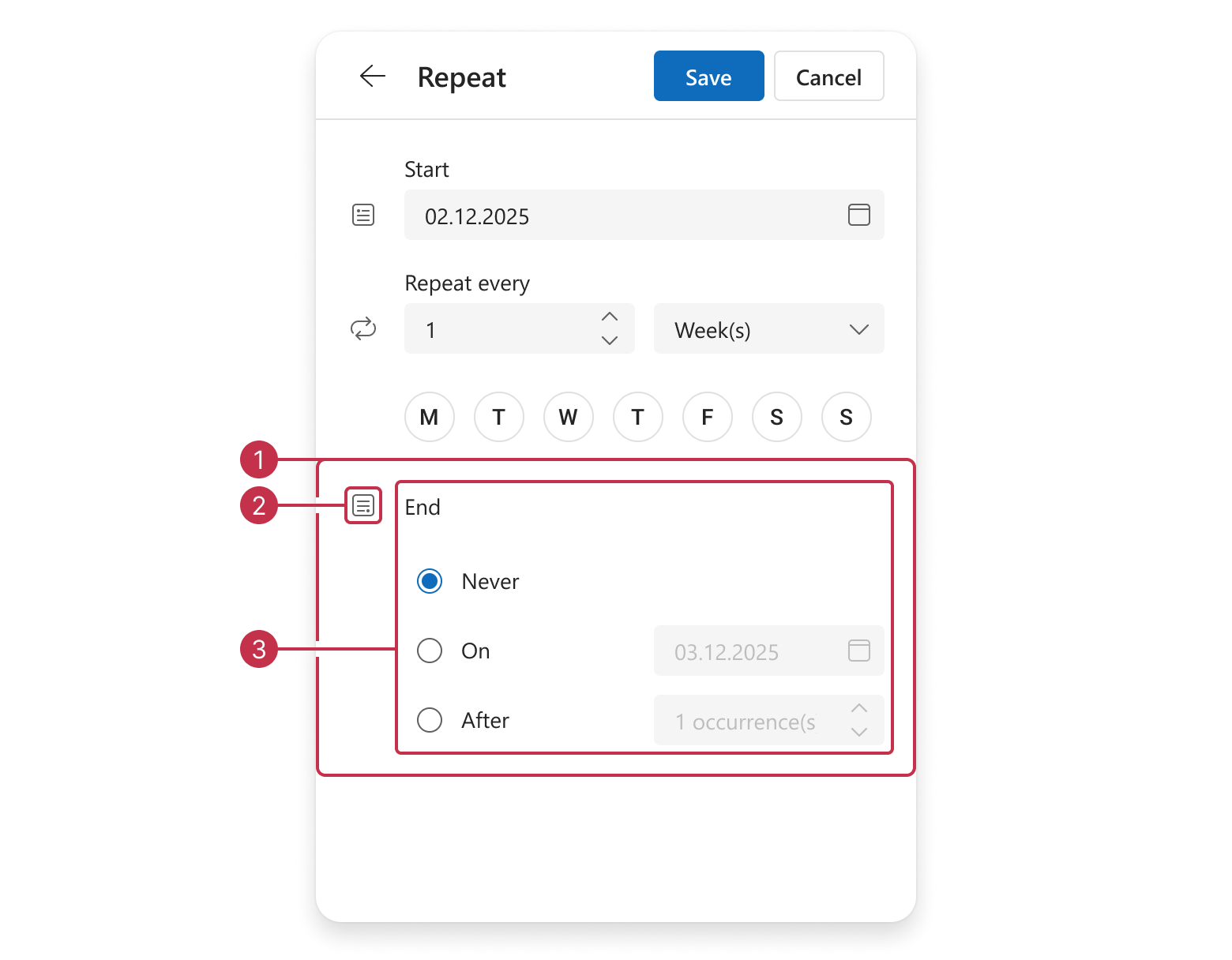
recurrenceEndGrouprecurrenceEndIconrecurrenceEndEditor
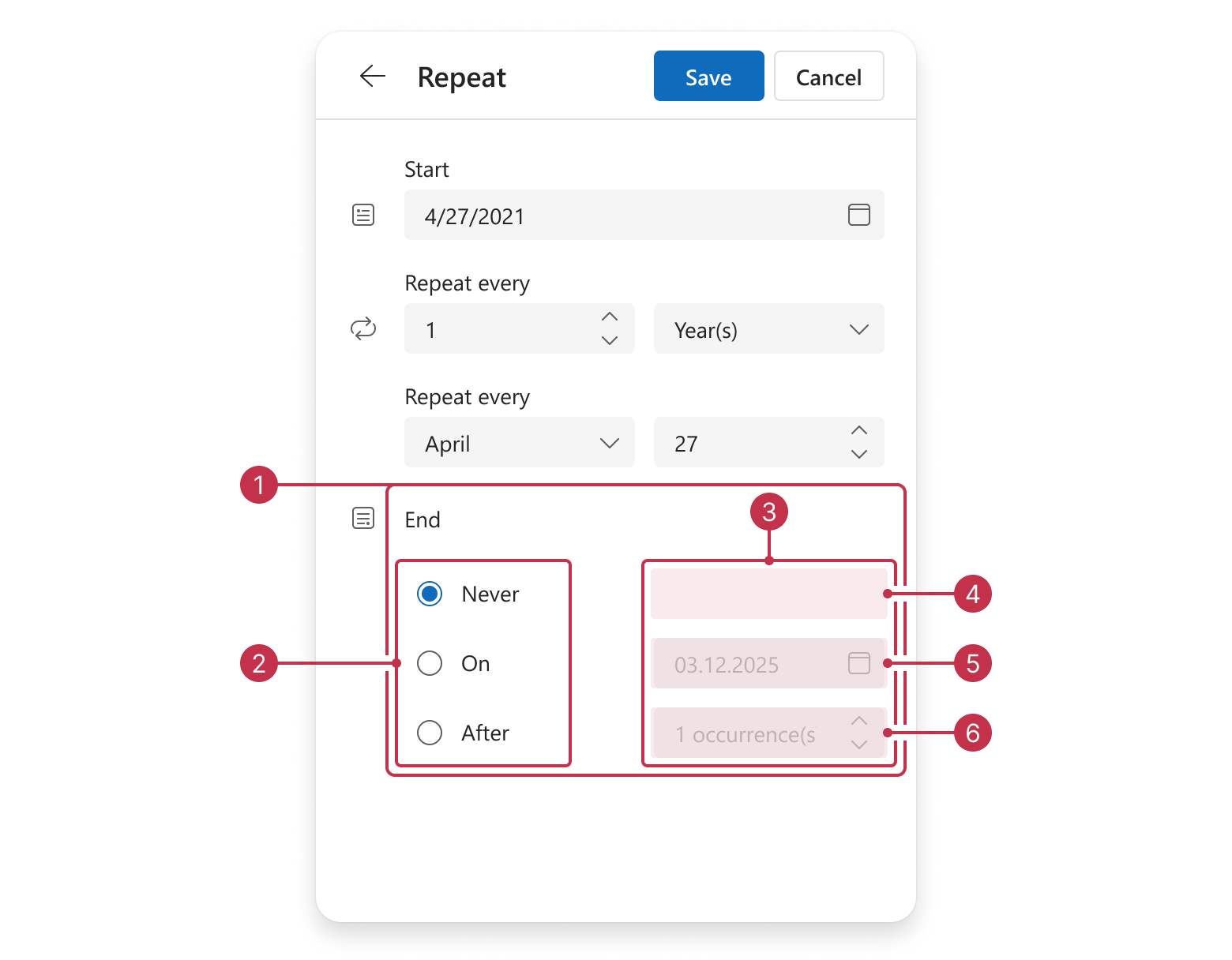
recurrenceEndEditorrecurrenceRepeatEndEditorrecurrenceEndEditorsGrouprecurrenceEndSpacerrecurrenceEndUntilEditorrecurrenceEndCountEditor

 Select one or more answers