React PivotGridFieldChooser - headerFilter
Configures the header filter feature.
A header filter allows a user to filter individual field's values by including or excluding them from the applied filter. Cicking a header filter icon invokes a popup menu displaying all the unique field values.
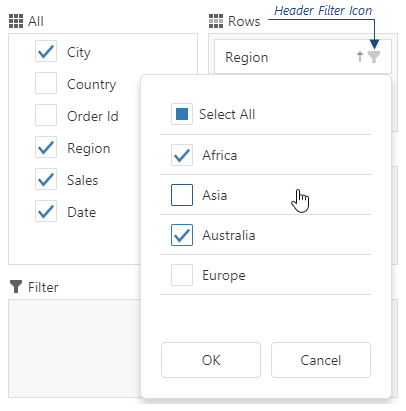
Assign true to the allowFiltering property to make the icons visible.
The user's filtering preferences are saved in the filterValues property. The header filter's Select All checkbox changes the filterType property.
allowSearch
Specifies whether searching is enabled in the header filter.
searchTimeout
Specifies a delay in milliseconds between when a user finishes typing in the header filter's search panel, and when the search is executed.
showRelevantValues
Specifies whether to show all field values or only those that satisfy the other applied filters.
For�example, a PivotGrid contains Continent and Country fields, and a user selects�Europe in the Continent's header filter. If the Country's header filter should filter out all non-European countries, set this property to true.

 Select one or more answers