Angular ActionSheet - items
An array of items displayed by the UI component.
Array<String | dxActionSheetItem | any>
The items array can contain:
- Strings
- Objects with fields described in this section
- Objects with any other fields. In this case, specify the itemTemplate.
If you need to update the UI component items, reassign the entire items array as shown in the following example:
actionSheetInstance.option('items', newItems);As an alternative to items, you can use the dataSource property. It accepts the DataSource object, whose underlying stores provide an API that allows you to update individual items without reassigning the entire item collection.
disabled
Specifies whether the UI component item responds to user interaction.
icon
Specifies the icon to be displayed on the action sheet button.
This property accepts one of the following:
- The icon's URL
- The icon's name if the icon is from the DevExtreme icon library
- The icon's CSS class if the icon is from an external icon library (see External Icon Libraries)
- The icon in the Base64 format
- The icon in the SVG format. Ensure that the source is reliable.
onClick
A handler for the click event raised for the button representing the given action sheet button.
Information about the event.
| Name | Type | Description |
|---|---|---|
| component |
The UI component's instance. |
|
| element |
The UI component's container. It is an HTML Element or a jQuery Element when you use jQuery. |
|
| event | Event (jQuery or EventObject) |
The event that caused the function to execute. It is an EventObject or a jQuery.Event when you use jQuery. |
Assign a function to perform a custom action when a button representing an action sheet item is clicked.
To navigate to a specific URL when the click event fires for action sheet buttons, assign that URL directly to this property.
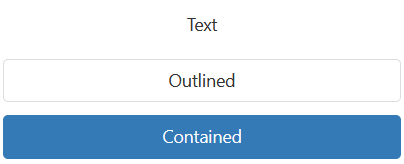
stylingMode
Specifies which style to apply to the button that is an action sheet item.
template
Specifies a template that should be used to render this item only.
jQuery
This property supports the following values:
- A template container as a jQuery object or DOM Node
- A function that returns a template container (as a jQuery object or DOM node)
For more information about templates, refer to the following help topic: DevExtreme Angular - Custom Templates.
$(function() {
    $("#actionSheetContainer").dxActionSheet({
        // ...
        items: [
            {
                // ...
                template: '<div>Custom Item</div>'
            }
        ]
    });
});
Angular
For more information about templates, refer to the following help topic: DevExtreme Angular - Custom Templates.
<dx-action-sheet ... >
    <dxi-action-sheet-item ... >
        <div *dxTemplate>
            <div>Custom Item</div>
        </div>
    </dxi-action-sheet-item>
</dx-action-sheet>
import { Component } from '@angular/core';

@Component({
    selector: 'app-root',
    templateUrl: './app.component.html',
    styleUrls: ['./app.component.css']
})
export class AppComponent {
    // ...
}
import { BrowserModule } from '@angular/platform-browser';
import { NgModule } from '@angular/core';
import { AppComponent } from './app.component';

import { DxActionSheetModule } from 'devextreme-angular';

@NgModule({
    declarations: [
        AppComponent
    ],
    imports: [
        BrowserModule,
        DxActionSheetModule
    ],
    providers: [ ],
    bootstrap: [AppComponent]
})
export class AppModule { }
Vue
For more information about templates, refer to the following help topic: DevExtreme Angular - Custom Templates.
<template>
    <DxActionSheet ... >
        <DxItem ... >
            <div>Custom Item</div>
        </DxItem>
    </DxActionSheet>
</template>

<script>

import DxActionSheet, {
    DxItem
} from 'devextreme-vue/action-sheet';

export default {
    components: {
        DxActionSheet,
        DxItem
    },
    // ...
}
</script>
React
For more information about templates, refer to the following help topic: DevExtreme Angular - Custom Templates.
import React from 'react';

import ActionSheet, {
    Item
} from 'devextreme-react/action-sheet';

const renderCustomItem = () => {
    return <div>Custom Item</div>;
}

const App() = () => {
    return (
        <ActionSheet ... >
            <Item ...
                render={renderCustomItem}
            >
            </Item>
        </ActionSheet>
    );
}
export default App;
See Also
text
Specifies text displayed for the UI component item.
If you use both this property and a template, the template overrides the text.
type
Specifies the type of the button that is an action sheet item.
See Also

 Select one or more answers